As Amazon Associates, we earn from qualifying purchases. This means we may receive a small commission at no extra cost to you if you click through and make a purchase.
The Lutron Caseta Claro brings the familiar paddle aesthetic of traditional decorator switches to connected smart lighting. Designed for standard lighting circuits and fan motors, this switch delivers seamless automation without altering your home’s interior styling. In this Lutron Caseta Claro smart switch review, we examine its performance, electrical requirements, and ecosystem support to help you decide if it fits your home.
This two-pack switch system is ideal for homeowners who want to modernize living spaces, porch lights, or exhaust fans while preserving a classic wallplate look. It integrates smoothly with Apple Home, Amazon Alexa, Google Assistant, Ring, and Sonos when paired with the required Lutron hub. However, renters who cannot change wall wiring, homes without neutral wires, and buyers seeking hub-free Wi-Fi switches should look elsewhere.
Lutron Caseta Claro at a Glance
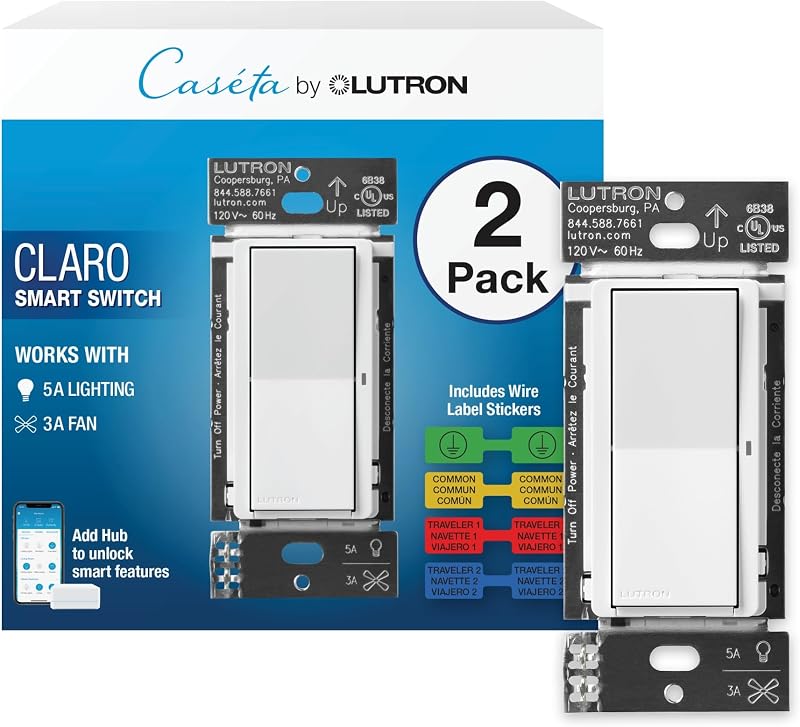
| Attribute | Detail |
|---|---|
| Switch Style | Decorator rocker paddle (Claro design) |
| Operation Mode | On/Off switch |
| Electrical Rating | 120 Volts AC, 600 Watts maximum |
| Supported Loads | 5A lighting (LED, incandescent, halogen) or 3A fan |
| Wiring Requirement | Neutral wire required |
| Circuit Compatibility | Single-pole or 3-way setups |
| Hub Requirement | Lutron Smart Hub (L-BDG2-WH, sold separately) |
| Smart Ecosystems | Apple Home, Amazon Alexa, Google Assistant, Ring, Sonos |
| Operating Temperature | 32 °F to 104 °F |
| Package Contents | (2) Claro smart switches, wire label stickers |
Neutral Wire and Electrical Requirements
Before purchasing, verifying the Lutron Caseta Claro neutral wire requirement is crucial. Traditional mechanical switches merely interrupt the hot wire to shut off lights. Smart switches, however, require continuous electricity to power their internal radios and processors. A neutral wire provides the complete electrical circuit needed to keep the switch connected to your network, even when your lights or fans are turned off.
To check your wiring, turn off power at your breaker panel and inspect the inside of your switch box. Homes built after the mid-1980s generally have a bundle of white neutral wires capped together in the back of the junction box. If your switch box contains only two wires without a neutral bundle, this switch will not work. In that case, look at no-neutral alternatives like the classic lutron caseta switch line designed for older wiring.
Reviewing the Lutron Caseta Claro smart switch specs shows solid residential ratings. Operating on standard 120-volt circuits, it supports up to 600 watts total load, handling 5 amps for lighting or 3 amps for ceiling or exhaust fan motors. Its operating temperature range spans 32 °F to 104 °F, allowing dependable operation in temperature-variable spots like garages and covered porches.
Smart Hub Integration and Ecosystem Connectivity
A key aspect of this system is the Lutron Caseta Claro smart hub requirement. The switch communicates using Lutron’s proprietary wireless technology rather than directly over household Wi-Fi, which requires the Lutron Smart Hub (model L-BDG2-WH, sold separately). Connecting through a dedicated bridge keeps your home Wi-Fi network free from device congestion, ensuring lightning-fast responses when activating lights through apps or voice commands.
Broad Lutron Claro smart switch compatibility simplifies integration into existing smart homes. Once connected to the hub, the switch pairs natively with Apple Home, Amazon Alexa, Google Assistant, Ring, and Sonos. You can trigger exterior lights from Ring camera motion events or manage lighting from wall interfaces like the sonoff nspanel pro 120 controller for centralized home management.
The Lutron app provides valuable convenience and automated security features. Its Smart Away mode randomly turns lights on and off during evening hours to make your home appear occupied while you travel. Automated schedules adjust automatically with seasonal sunrise and sunset changes, ensuring you return to a well-lit home year-round even if your internet connection temporarily drops.
Lighting and Ceiling Fan Capabilities
The Lutron Caseta Claro is an On/Off switch, not a dimmer. It handles multiple bulb types, including dimmable and non-dimmable LEDs, incandescent, and halogen bulbs up to 600 watts or 5 amps. Because the switch controls the entire circuit, you can automate an entire group of recessed ceiling lights or outdoor fixtures without buying costly individual smart bulbs.
Using the Lutron Caseta Claro switch for ceiling fans provides simple on and off control for fan motors up to 3 amps. It does not regulate fan speed or reverse blade direction. Instead, you set your ceiling fan pull chain to your preferred speed, and the Claro switch powers the fan on and off at that set speed via app, voice, or wall paddle.
Thanks to its clean contact relay, this switch is well-suited for exterior lighting circuits where dimming is unnecessary. Outdoor fixtures, security lights, and landscape transformers often buzz or flicker when paired with electronic dimmers. The Claro switch delivers clean, full-voltage switching that keeps porch and garage lights functioning reliably without flicker.
Installation Process and Multi-Way Configurations
Understanding how to install Lutron Caseta Claro switch hardware is straightforward for anyone familiar with basic home electrical safety. Always shut off power at the main breaker before working. The two-pack includes wire label stickers to tag line, load, neutral, and ground wires before removing your old switch. Sturdy screw terminals provide secure, long-lasting wire connections inside the wall box.
Planning a Lutron Caseta Claro 3-way setup can be accomplished in two ways. You can wire the switch to an approved Claro smart accessory switch using existing traveler wires, or mount a wireless Pico remote (PJ2-P2B-GWH) with a wall bracket (PICO-WBX-ADAPT), both sold separately. The wireless Pico approach lets you create a 3-way switch anywhere without pulling new cables or cutting into drywall.
For utility rooms like pantries or laundry spaces where hands-free activation is preferred, dedicated motion switches like the lutron maestro motion sensor switch are often more practical. However, for hallways, staircases, and living areas where multi-location control is required, the Claro switch and Pico remote combination provides exceptional flexibility.
Design Aesthetics and Everyday Usability
A standout feature of the Claro smart switch is its classic decorator aesthetic. Earlier smart switches often used unconventional buttons or awkward shapes that looked out of place beside standard switches. The Claro smart switch adopts the clean, flat rocker paddle design found in standard decorator switches, blending seamlessly into multi-gang switch plates alongside your existing switches.
Daily operation is intuitive for everyone in the household. Pressing the top of the rocker paddle turns the light or fan on, while pressing the bottom turns it off. Guests and family members can operate the switch naturally without needing apps or voice commands. Note that coordinating decorator wallplates are sold separately, allowing you to choose matching screwless or standard faceplates.
While commercial lighting installations may require specialized hardware like the lutron fcjs-010 powpak wireless white & green module, the Claro switch provides commercial-grade switching durability for residential spaces. Its compact profile fits neatly inside standard junction boxes, leaving plenty of room for wiring.
Lutron Caseta Claro Pros and Cons
Two swatches, side by side. Everything on both sides is read from the product listing and from buyer feedback on Amazon – nothing here comes from handling the product.
What works
- Classic Claro decorator rocker paddle design
- Controls 5A lighting loads or 3A exhaust fans
- Broad compatibility with Apple Home, Alexa, and Google
- Flexible 3-way setup with accessory switch or Pico
- Smart Away feature automates random vacation lighting
What to check
- Requires neutral wire inside the electrical box
- Requires separate Lutron Smart Hub for app controls
- Wallplates and Pico mounting brackets sold separately
- Binary On/Off switching with no dimming functionality
Who Should Buy the Lutron Caseta Claro
Deciding if this switch fits your home depends on your wiring, existing equipment, and control preferences. Consider the following points before buying:
Buy It If
- You want smart lighting that matches standard decorator rocker switches throughout your home.
- Your switch boxes contain accessible neutral wires.
- You use Apple Home, Amazon Alexa, Google Assistant, Ring, or Sonos and plan to use the Lutron hub.
- You need an On/Off switch for outdoor porch lights, garage fixtures, or exhaust fans up to 3 amps.
Skip It If
- Your home switch boxes lack neutral wiring.
- You need dimming control for overhead lighting, as this model is strictly an On/Off switch.
- You want standalone Wi-Fi switches that operate without a separate hardware hub.
Final Verdict
When deciding if the Lutron Caseta Claro smart switch is worth it, the answer is an easy yes for homeowners with neutral wiring who value dependable performance over cheap gadgets. By combining Lutron’s reliable wireless communication with the popular Claro rocker paddle, this switch avoids the odd designs and frequent connection dropouts common among Wi-Fi competitors. It controls lighting circuits and fan motors smoothly without congesting your home Wi-Fi network.
While the requirement for a separate Lutron Smart Hub and neutral wiring adds initial planning, the long-term payoff in responsiveness, automated security via Smart Away, and flexible 3-way setups makes it an exceptional choice. For anyone seeking a high-quality smart switch that preserves the look of traditional switches, the Lutron Caseta Claro two-pack is a solid investment.
FAQ
Does the Lutron Caseta Claro require a neutral wire?
Yes, the Lutron Caseta Claro smart switch requires a neutral wire in the switch box. The neutral wire provides continuous power to the switch’s internal communication radio and logic board, ensuring it remains responsive to app and voice controls even when lights or fans are turned off.
Can the Lutron Caseta Claro control ceiling fan speeds?
No, the Lutron Caseta Claro functions as an On/Off switch and does not adjust fan speeds or reverse motor direction. It supports fan motors up to 3 amps, toggling power at whatever manual speed setting is selected on the fan’s pull chain.
Do I need the Lutron Smart Hub for the switch to work manually?
No, the switch operates manually right after installation, letting you turn lights and fans on or off by pressing the paddle. However, the Lutron Smart Hub (L-BDG2-WH) is required to enable app control, voice assistant integration, and automated schedules.
How does the Lutron Caseta Claro handle a 3-way light switch setup?
The Claro smart switch supports 3-way setups using either a wired Claro smart accessory switch or a wireless Pico remote (PJ2-P2B-GWH) with a wall bracket (PICO-WBX-ADAPT). The wireless Pico remote can be mounted over an existing wall box or directly onto drywall without pulling traveler wires.
Are wallplates included with the Lutron Caseta Claro two-pack?
No, wallplates are sold separately. The package includes two Claro smart switches and wire label stickers. Because the switch uses standard decorator dimensions, you can use any standard decorator faceplate or Lutron Claro screwless wallplate.
Prices and specifications above are read from the product page and can change without notice. The score is the average left by Amazon buyers; nothing on this page comes from handling the product.