As Amazon Associates, we earn from qualifying purchases. This means we may receive a small commission at no extra cost to you if you click through and make a purchase.
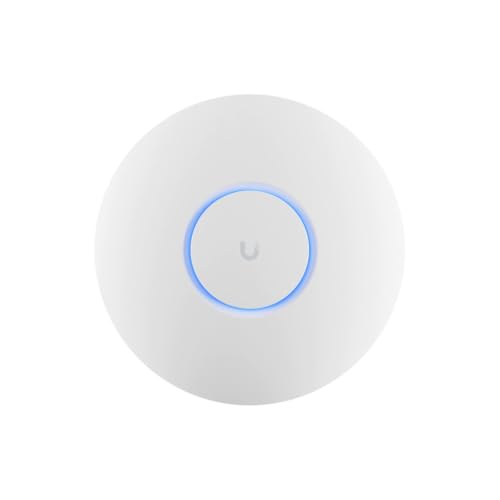
Upgrading home networking gear can often feel intimidating, especially when transitioning away from basic all-in-one equipment provided by internet service providers toward modular, commercial-grade hardware. The Ubiquiti U6+ is a compact wireless access point designed to bring modern Wi-Fi 6 performance, dual-band stability, and high device handling into residential spaces and small business venues without unnecessary bulk. In short, this access point offers a sleek, dependable way to eliminate frustrating dead zones and boost overall connection consistency throughout your living space, provided your setup is prepared to deliver power over an ethernet cable.
This unit suits smart home enthusiasts, remote workers, and growing households that suffer from dropped connections caused by dozens of simultaneous phones, laptops, and streaming devices competing for airtime. It is particularly compelling for anyone already building or expanding a modular network system where neat ceiling or wall installations are preferred. On the other hand, casual users who want a simple plug-and-play Wi-Fi router that plugs directly into an ordinary wall outlet with an included AC adapter should look elsewhere, as this device requires separate network routing hardware and power delivery equipment to function.
Ubiquiti U6+ at a Glance

| Feature | Specification |
|---|---|
| Wireless Standard | Dual-band Wi-Fi 6 (2×2 MIMO) |
| Ethernet Connection | 1 x Gigabit Ethernet (1xGbE) port |
| Power Method | Power over Ethernet (PoE) |
| Power Supply Included | No PoE injector included |
| Wireless Coverage | Up to 140 m² (1,500 ft²) |
| Concurrent Device Capacity | 300+ connected devices |
| Unit Weight | 14.5 ounces |
| Item Model Number | U6+ |
| Manufacturer | UBIQUITI |
| Intended Venue | Small and medium-sized businesses, homes, network expansion |
Wi-Fi 6 Speed and 2×2 Dual-Band Performance
Understanding wireless terminology is essential when picking modern networking equipment. The Ubiquiti U6+ utilizes Wi-Fi 6 technology operating on dual-band frequencies. Unlike older standards that handle data transfers sequentially, Wi-Fi 6 allows the access point to communicate with multiple client devices simultaneously with significantly reduced latency. The listing notes a 2×2 dual-band architecture, meaning the internal radio hardware features two dedicated transmit and two dedicated receive antennas across its operational wireless frequencies. This setup ensures responsive performance during simultaneous video conferencing, multi-stream 4K entertainment, and responsive online gaming.
When evaluating the ubiquiti u6 plus vs u6 lite, the manufacturer specifically positions the U6+ as an improved successor. The listing highlights that the U6+ brings higher overall performance and dual-band Wi-Fi 6 support to an entry-level form factor, whereas earlier entry models often featured older wireless generation components on one of their operational bands. This upgrade delivers a tangible boost to real-world ubiquiti u6 plus wifi 6 speed, ensuring that modern laptops, tablets, and smartphones capable of using Wi-Fi 6 achieve optimal wireless data transfer rates without being held back by legacy bottlenecks.
Shoppers exploring the broader wireless market often compare various generations of hardware before committing. For instance, when looking at bleeding-edge options, users might research the ubiquiti u7 lite wifi 7 access point to decide whether they require future-proof protocols or if dependable Wi-Fi 6 provides everything their current client hardware can actually utilize. Because most handheld devices, smart televisions, and personal computers today are engineered around 2×2 Wi-Fi 6 chips, the U6+ aligns perfectly with the wireless capabilities of modern consumer electronics.
Coverage Range and Multi-Device Capacity
Achieving consistent ubiquiti u6 plus range coverage is one of the most critical aspects of setting up reliable home wireless. The official listing specifications rate this compact access point for up to 140 square meters, which translates to approximately 1,500 square feet of wireless coverage. For standard residential layouts, this footprint easily blankets an entire ranch-style house, a large apartment, or a dedicated floor in a multi-story home when mounted in a central position. Elevating the unit onto a ceiling or high on an interior wall allows the radio signal to radiate outward and downward with minimal physical obstruction from furniture.
In addition to spatial coverage, device handling is an area where this access point excels. Modern households are crowded with smart gadgets, including smart plugs, light bulbs, thermostats, security doorbells, and tablets. The product listing verifies that the U6+ supports 300+ connected devices simultaneously. Basic consumer routers frequently crash, stall, or drop connections when forty or fifty smart home devices compete for bandwidth, but the robust hardware inside this access point prevents traffic jams by managing airtime access efficiently across all connected clients.
Selecting the Ubiquiti U6+ for home deployments solves dead zone frustrations in high-traffic spaces, but home layout matters. Dense building materials such as brick, concrete, plaster, or metallic ductwork will naturally attenuate radio signals. If you need coverage outdoors on a patio or require flexible desktop placement where ceiling cabling is impossible, looking at a versatile standalone option like the unifi u6 mesh may better serve those specific outdoor or open-table surface requirements.
PoE Power and Hardware Requirements
The most important detail every first-time buyer must know before ordering revolves around ubiquiti u6 plus poe power delivery. Standard home electronics plug into a wall outlet using a bulky AC adapter brick. The Ubiquiti U6+ does not use an AC wall cord. Instead, it relies exclusively on Power over Ethernet (PoE) via its single 1xGbE network port. PoE simplifies ceiling and attic installations because you only run a single slim ethernet cable to deliver both high-speed data and electrical current to the unit.
However, the product listing clearly and explicitly warns: No POE Injector Included. This means opening the box will reveal the compact access point, but you will not receive a power supply. To operate the unit, you must supply power through an existing PoE network switch or purchase a separate standalone PoE injector that sits between your network router and the access point. Overlooking this requirement is the single biggest stumbling block for newcomers to commercial-style networking gear.
Examining the physical ubiquiti u6 plus specs, the device weighs a modest 14.5 ounces. This light profile makes overhead installation secure without requiring heavy-duty mounting anchors. While the product listing lists quirky database entries—such as language as German and an entry stating unknown batteries required—be assured this is purely an artifact of catalog entry fields. Access points are wired networking units that run entirely from ethernet line power and do not use consumer chemical batteries of any kind.
Ubiquiti U6+ Setup and Network Integration
A frequent misconception among beginners is assuming that a dedicated access point is a complete wireless router. It is not. The ubiquiti u6 plus access point is strictly responsible for broadcasting and managing the wireless radio signal. You still require an internet modem and a primary router upstream to assign local IP addresses, manage firewall rules, and connect your home to your internet service provider. The U6+ plugs into your router or downstream switch to distribute that internet connection through the air.
Executing the ubiquiti u6 plus setup is remarkably user-friendly thanks to the UniFi software platform. Setup does not require navigating clunky, archaic browser menus on an individual IP address. Instead, you can download the UniFi mobile app on your smartphone or manage the device through a central UniFi network application. Once the access point is plugged into a live PoE connection, the mobile app detects the hardware nearby via Bluetooth, guiding you through naming your Wi-Fi network (SSID) and setting your security passphrase within minutes.
The real power of UniFi hardware emerges when you expand your system over time. If you install multiple access points across a larger residence, they link together under a single management dashboard, allowing your phone or laptop to roam seamlessly from one room to another without dropping a video call. This unified environment also extends beyond wireless signals, seamlessly sharing network resources if you choose to integrate smart security hardware such as the unifi g6 instant wireless camera onto your protected home network.
Assessing Practical Value for Everyday Homes
When asking yourself is ubiquiti u6 plus worth it, the answer depends entirely on what you expect from your home network. If your household is frustrated by inconsistent internet, frequent connection drops, and dead zones caused by an underpowered all-in-one ISP gateway, transitioning to dedicated access point hardware delivers commercial-grade reliability. You gain an uncluttered ceiling-mounted installation, steady speeds, and a device engineered to operate continuously without requiring weekly power-cycling.
This ubiquiti u6 plus review demonstrates that the hardware strikes an ideal middle ground for standard households. While higher-tier access points offer 4×4 MIMO radios or multi-gigabit ethernet ports, most typical internet plans and home client devices cannot saturate those connections anyway. The 1xGbE uplink and 2×2 Wi-Fi 6 radio match real-world home needs without paying for extra hardware capabilities that your everyday devices cannot leverage.
Ubiquiti U6+ Pros and Cons
Two swatches, side by side. Everything on both sides is read from the product listing and from buyer feedback on Amazon – nothing here comes from handling the product.
What works
- Dual-band Wi-Fi 6 wireless performance
- Supports over 300 connected devices
- Broad coverage footprint reaching 1,500 square feet
- Single-cable installation using Power over Ethernet
- Compact and lightweight 14.5-ounce chassis
What to check
- No PoE injector included in package
- Requires external router or gateway to function
- Ethernet connection capped at 1 Gbps
Who Should Buy the Ubiquiti U6+
Buy It If
- You want clean, reliable Wi-Fi 6 coverage across up to 1,500 square feet with an unobtrusive ceiling or wall mount.
- Your home is full of smart home accessories, streaming devices, and phones requiring support for over 300 connected clients.
- You already own a PoE switch or are comfortable purchasing a separate PoE injector to power your gear over ethernet.
- You want the convenience and unified control of managing your home Wi-Fi through the UniFi mobile app.
Skip It If
- You need an all-in-one router that plugs straight into a cable modem and uses a standard electrical wall outlet plug.
- You want an out-of-the-box system that includes every required power supply without ordering an extra injector.
- Your home network infrastructure utilizes multi-gigabit wired connections exceeding standard 1 Gbps ethernet limits.
Final Verdict
The Ubiquiti U6+ delivers enterprise-grade wireless stability in a compact, attractive package built for homes and small business environments. By combining 2×2 dual-band Wi-Fi 6 performance, broad 1,500-square-foot coverage, and a massive 300+ client capacity, it effortlessly cures the congestion and dead zones that plague standard consumer routers. Its lightweight 14.5-ounce footprint allows clean architectural mounting that keeps messy cables tucked out of view.
To get the most out of this hardware, buyers must be mindful of its operational requirements. Because the listing explicitly states that no PoE injector is included, you must account for an external PoE power source when planning your setup. For homeowners ready to take control of their network with clean cabling and dependable performance, the U6+ represents a smart, dependable upgrade that elevates your daily wireless experience.
FAQ
Does the Ubiquiti U6+ replace my existing home router?
No, the Ubiquiti U6+ is a dedicated wireless access point, not a router. It does not assign IP addresses or connect directly to an ISP optical terminal or cable modem on its own. You must keep your existing wired router or network gateway in place and connect the U6+ downstream to broadcast the Wi-Fi signal.
How do I power the Ubiquiti U6+ if no power supply comes in the box?
Because the listing explicitly states that no PoE injector is included, you must provide power through an ethernet cable. You can achieve this by plugging the unit into a network switch that supports Power over Ethernet (PoE) or by purchasing a separate standalone PoE injector that plugs into an electrical outlet and injects power into the network cable.
What is the primary difference between the Ubiquiti U6+ and the older U6 Lite?
According to the product specifications, the U6+ is an improved design over the U6 Lite. It provides higher overall wireless performance and delivers dual-band Wi-Fi 6 capability across both operating frequencies, ensuring modern client devices experience faster and more reliable connections.
Can a single Ubiquiti U6+ cover an entire multi-story house?
The unit is rated for coverage up to 140 square meters, or approximately 1,500 square feet. In a multi-story home, structural flooring materials like wood beams, metal ducting, or concrete can degrade wireless signals between levels. While it can cover a small two-story townhouse if placed centrally, larger multi-level homes typically benefit from placing one access point on each level.
Do I need to leave a computer running 24/7 to manage the access point?
No, you do not need a computer running continuously. You can perform the initial setup and adjust wireless settings directly from the free UniFi mobile app on your smartphone, or run the controller software on a computer only when you need to change settings or update device firmware.
Prices and specifications above are read from the product page and can change without notice. The score is the average left by Amazon buyers; nothing on this page comes from handling the product.


