
As Amazon Associates, we earn from qualifying purchases. This means we may receive a small commission at no extra cost to you if you click through and make a purchase.
As an Amazon Associate we earn from qualifying purchases. Links on this page are affiliate links.
Smart Platform Explained for Modern TVs
A smart platform is the operating system built directly into a television or projector. It manages the graphical user interface, runs streaming applications, handles wireless network connections, and organizes physical hardware inputs. Having this smart platform explained helps you evaluate how system software influences your day-to-day display operation.
Retail listings and manufacturer specification tables identify this feature under the Smart Platform or Operating System entry. The primary values available on current displays include Google TV, Fire TV, and Roku TV. Manufacturers license these pre-built platforms to provide stable software environments, dedicated application stores, recurring firmware updates, and integrated media playback tools.
Each platform functions differently based on its core design and ecosystem. Google TV aggregates content recommendations across different subscription services onto a personalized home tab, while providing native Google Cast and Google Assistant integration. Fire TV organizes content around digital media libraries and connects smoothly with Amazon Alexa hardware. Roku TV relies on an uncluttered grid of app icons and physical input selectors, maintaining uniform access without favoring specific streaming providers.
Buyers care about the platform spec because it governs the daily viewing experience beyond pure screen hardware. The platform dictates navigation speed, remote control shortcut mapping, voice search capabilities, and long-term application compatibility. Picking a display with the right platform ensures seamless operation with your existing mobile devices and smart home gear without requiring an extra streaming box.
Smart Platform Options Compared
Google TV
Google TV organizes movies and shows across separate streaming services into unified recommendation rows on your home screen. You get curated suggestions based on your viewing history and direct integration with Google services. This platform suits viewers who watch across multiple subscription libraries and want consolidated content aggregation. A trade-off is that the dense, recommendation-heavy interface can feel cluttered if you prefer a basic app grid. For instance, the TCL 55-Inch Mini-LED 144Hz Google TV pairs this aggregated content navigation with high-refresh gaming and Dolby Vision HDR playback.
Fire TV
Fire TV emphasizes deep integration with Amazon services and smart home hardware. The interface features live TV channels, Prime Video rows, cloud gaming access, and direct Alexa voice control for navigation. This system suits viewers tied to the Amazon ecosystem and smart home controls. The trade-off is a home screen that prioritizes Amazon-hosted media, sponsored placements, and Prime channels over external services. The Amazon Ember 55-Inch 4-Series 4K Fire TV demonstrates this setup by combining Fire TV software with Wi-Fi 6 connectivity, HDR10 video processing, and hands-free Alexa voice commands.
Roku TV
Roku TV uses a straightforward, app-centric grid that places installed streaming channels and physical inputs alongside each other. You navigate clear tiles without heavy algorithmic recommendations taking over the primary display. This platform suits viewers who prioritize clean menus, platform neutrality, and quick access to individual streaming applications. The trade-off is fewer cross-service content aggregation feeds compared to competitors. As an example, the Hisense 65-Inch QLED 4K Roku TV pairs this simplified interface with a quantum-dot panel, Dolby Vision HDR playback, and DTS audio support for straightforward daily viewing.
Evaluating the Built-in Smart Platform
Who needs it
You should focus on the smart platform spec if you want a self-contained entertainment setup. Selecting a display with your preferred operating system eliminates the need for external media streamers, spare power outlets, and extra HDMI cables. This matters if you wall-mount your screen and prefer a clean installation with minimal wiring. You also benefit if your household already relies on a specific ecosystem for voice commands, smart home routines, or shared account profiles. A single remote control manages power, volume, and navigation across your installed media services. For anyone seeking a direct, standalone display that handles playback right out of the box, matching the built-in operating system to your digital habits ensures straightforward daily operation.
Who can skip it
You can disregard the smart platform spec if you already own a dedicated streaming player, gaming console, or media PC. Connecting an external device bypasses the integrated interface entirely. Instead, prioritize hardware specifications that dictate visual performance and audio capabilities. Look closely at display panel technology, peak brightness measured in nits, native refresh rates, and local dimming zones. You should also verify HDMI port standards, such as HDMI 2.1 bandwidth, and physical audio pass-through support. These core hardware specs define your picture quality and cannot be upgraded later with plug-in accessories.
Smart TV Specification Glossary
Display Technology
This spec identifies your panel hardware, such as OLED or LED. It determines contrast and brightness levels when you watch movies or use built-in streaming apps.
Resolution
Resolution measures the pixel grid across your display. Common standards include 4K UHD at 3840×2160 pixels. Higher numbers deliver sharper picture details when you stream compatible high-definition media.
Refresh Rate
This spec counts how often your display redraws images each second, measured in hertz. Typical values are 60Hz and 120Hz. Higher rates give you clearer motion during fast action.
HDR Format
HDR formats expand contrast and color depth. Common profiles include HDR10 and Dolby Vision. Compatible platform apps decode these signals so you see brighter highlights and richer shadows.
Audio Format Pass-Through
This feature sends multichannel audio from smart apps to external audio hardware via HDMI eARC. Standard formats include Dolby Atmos and DTS:X, delivering immersive surround sound to your setup.
Casting Protocol
These wireless protocols stream video and audio from personal devices to your television. Common examples include Apple AirPlay and Google Cast, letting you mirror displays without opening TV apps.
Voice Assistant Integration
This platform tool lets you search titles, adjust volume, and navigate menus using voice commands via a microphone remote. Common built-in examples include Google Assistant and Amazon Alexa.
| # | Product | Best for | Price |
|---|---|---|---|
| 1 | TCL 55-Inch Mini-LED 144Hz Google TV | Google TV users wanting 144Hz gaming performance | |
| 2 | INSIGNIA 55-Inch F50 Series 4K LED Fire TV | Fire TV streaming in an everyday display | |
| 3 | Roku 85-Inch Select Series 4K QLED TV | large rooms wanting simple Roku TV navigation | |
| 4 | TCL 85-Inch 144Hz QLED Google TV | large-room gaming and Google TV streaming | |
| 5 | Amazon Ember 55-Inch 4-Series 4K Fire TV | Alexa users wanting console-free cloud gaming | |
| 6 | Hisense 65-Inch QLED 4K Roku TV | Roku streaming on a mid-sized QLED screen |
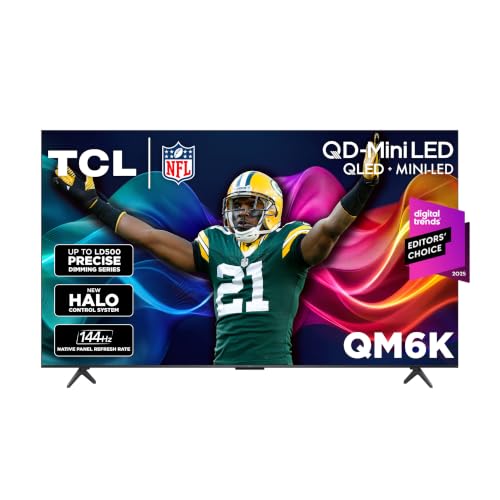
TCL 55-Inch Mini-LED 144Hz Google TV
Best for: Google TV users wanting 144Hz gaming performance
- Smart Platform
- Google TV
- Screen Size
- 55-Inch
- Resolution
- 4K
- Display Technology
- QD-Mini LED, QLED
- Refresh Rate
- 144Hz
- HDR Format
- Dolby Vision, HDR10+, HDR10, HLG
This 55-inch 4K television pairs the Google TV smart platform with a QD-Mini LED display and a 144Hz native refresh rate. You get aggregated streaming services, personalized recommendations, and full HDR format support covering Dolby Vision and HDR10+. It suits fast-paced gaming setups and sports viewers who want high-frame-rate motion alongside an organized, app-focused smart interface.
- 144Hz native refresh rate for high-frame-rate gaming and sports
- QD-Mini LED display with local dimming technology
- Supports Dolby Vision, HDR10+, HDR10, and HLG formats
- Built-in Google TV platform for unified streaming access
- Stand depth measures 11.6 inches, requiring a deep media console
- Data does not specify hands-free far-field voice hardware
- You use Google TV to organize streaming services and watchlists in one place.
- You connect modern gaming consoles or PCs capable of 120Hz or 144Hz output.
- You watch HDR content across multiple formats including Dolby Vision and HDR10+.
- You prefer the Fire TV or Roku smart television interfaces.
- You have a shallow table or console that cannot support an 11.6-inch depth.
Verdict: TCL 55-Inch QD-Mini LED Google TV gives sports fans and gamers a fast 144Hz panel combined with Google TV's consolidated content discovery. It serves viewers who want extensive HDR format handling and smooth playback in medium-sized rooms.

INSIGNIA 55-Inch F50 Series 4K LED Fire TV
Best for: Fire TV streaming in an everyday display
- Smart Platform
- Fire TV
- Screen Size
- 55-inch
- Resolution
- 4K UHD
- Display Technology
- LED
- HDR Format
- HDR10
- Audio Format
- DTS Virtual-X
This 55-inch 4K television runs on the Fire TV platform, giving you direct access to major streaming apps and Alexa voice commands. It features a standard LED panel with HDR10 support and DTS Virtual-X audio processing. With three HDMI ports including eARC plus AirPlay integration, it serves viewers who want straightforward Fire OS smart navigation in an everyday display.
- Built-in Fire TV operating system with Alexa Voice Remote
- DTS Virtual-X audio processing and HDMI eARC port
- Apple AirPlay support alongside composite AV and headphone jacks
- Standard LED panel lacks Mini-LED or QLED color enhancements
- Limits wired inputs to three HDMI ports
- You prioritize Amazon Alexa voice control and the Fire TV interface.
- You need legacy physical connections like composite AV and a 3.5mm headphone jack.
- You want advanced display hardware like QLED or Mini-LED backlighting.
- You need four or more HDMI ports for external media gear.
Verdict: Insignia 55-Inch F50 LED 4K Fire TV suits viewers who prioritize Fire OS streaming integration and standard 4K HDR10 playback over advanced backlighting tech.

Roku 85-Inch Select Series 4K QLED TV
Best for: large rooms wanting simple Roku TV navigation
- Smart Platform
- Roku TV
- Screen Size
- 85-Inch
- Resolution
- 4K
- Display Technology
- QLED
- HDR Format
- HDR10
- Intended Use
- Streaming, Sports
This 85-inch television runs the Roku TV platform, giving you a clean grid interface with voice search and quick app launches. It pairs a 4K QLED display with HDR10 for bright color output. If you want a straightforward operating system on an expansive screen without switching between external streaming sticks, this setup fits your living room.
- Native Roku TV smart platform with unified search and personalized home screen
- 85-inch 4K QLED panel with HDR10 support
- Enhanced voice remote featuring app shortcuts and lost-remote finder
- Apple AirPlay support along with Siri, Alexa, and Google Assistant compatibility
- Limited to HDR10 with no stated support for Dolby Vision
- Footprint spans 74.4 inches wide and weighs 60.4 pounds
- You want the straightforward Roku TV interface on an 85-inch display.
- You frequently stream media using Apple AirPlay or smart home voice controls.
- You require advanced HDR formats beyond standard HDR10.
- You lack furniture to support a 74.4-inch wide, 60.4-pound screen.
Verdict: Roku 85-Inch Select Series 4K QLED TV delivers simple Roku TV navigation and voice search on an expansive display for viewers wanting hassle-free streaming.

TCL 85-Inch 144Hz QLED Google TV
Best for: large-room gaming and Google TV streaming
- Smart Platform
- Google TV
- Screen Size
- 85 Inch
- Resolution
- 4K UltraHD
- Display Technology
- QLED
- Refresh Rate
- 144Hz
- HDR Format
- Dolby Vision, HDR10+, HDR10, HLG
This 85-inch 4K QLED display runs on the Google TV smart platform, giving you centralized access to streaming services and voice control through Google Assistant. A native 144Hz refresh rate pairs with Dolby Vision and HDR10+ support for fast-motion clarity. It fits your living space if you need an expansive screen optimized for gaming and streaming.
- Native 144Hz refresh rate handles high-frame-rate inputs
- Wide HDR compatibility including Dolby Vision and HDR10+
- Works with Google Assistant, Amazon Alexa, and Apple HomeKit
- Google TV platform consolidates streaming channels and recommendations
- Network hardware limits wireless connections to Wi-Fi 5
- Large 66.8-pound chassis spans 74.4 inches wide
- You want high-frame-rate 144Hz playback for sports and gaming.
- You use Google Assistant or Apple HomeKit ecosystems.
- You watch content mastered in both Dolby Vision and HDR10+.
- You lack a media console wide enough for a 74.4-inch frame.
- You rely on Wi-Fi 6 infrastructure for home streaming.
Verdict: TCL 85-Inch 144Hz QLED Google TV delivers fluid 144Hz motion and extensive HDR format support for buyers needing an oversized smart display.

Amazon Ember 55-Inch 4-Series 4K Fire TV
Best for: Alexa users wanting console-free cloud gaming
- Smart Platform
- Fire TV
- Screen Size
- 55-inch
- Resolution
- 4K Ultra HD
- HDR Format
- HDR10+
- Audio Format
- Dolby Audio
- Dimensions
- 48.3 × 11.3 × 31.3 inches
This 55-inch 4K television runs the Fire TV operating system with an Alexa+ voice remote. You get HDR10+ support, a quad-core processor, and Wi-Fi 6 connectivity for streaming. Built-in Omnisense presence sensors wake the screen as you enter the room. It suits you if you want cloud gaming through Amazon Luna and Xbox Game Pass without a console.
- Wi-Fi 6 connectivity with quad-core processor
- Built-in Omnisense sensors wake screen on entry
- Cloud gaming via Amazon Luna and Xbox Game Pass
- HDR10+ and 4K Ultra HD video support
- Largest available size in this series is 55 inches
- Does not include Dolby Vision support
- You stream games directly via Xbox Game Pass or Amazon Luna.
- You prefer navigating with an Alexa+ voice remote on Fire TV.
- You have a Wi-Fi 6 home network setup.
- You need a display larger than 55 inches.
- You prefer the Google TV or Roku TV platform.
Verdict: Amazon Ember 55-Inch 4-Series Fire TV suits streamers who rely on Alexa voice controls, Wi-Fi 6 speeds, and console-free cloud gaming. The display integrates presence detection to activate visuals the moment you enter the room.
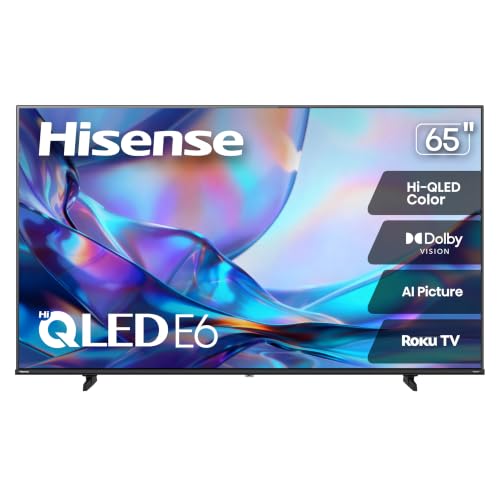
Hisense 65-Inch QLED 4K Roku TV
Best for: Roku streaming on a mid-sized QLED screen
- Smart Platform
- Roku TV
- Screen Size
- 65 Inch
- Resolution
- 4K UHD
- Display Technology
- Hi-QLED
- HDR Format
- Dolby Vision, HDR10, HLG
- Audio Format
- DTS Virtual:X
This Hisense 65-inch television runs the Roku TV platform for simplified app navigation and integrated streaming. It pairs a 4K UHD QLED panel with multi-format HDR support, including Dolby Vision, HDR10, and HLG. Built-in DTS Virtual:X audio processes sound. It fits you if you want an accessible smart interface paired with quantum-dot color.
- Roku TV operating system with straightforward grid navigation
- Quantum dot display with 4K UHD resolution
- Multi-format HDR including Dolby Vision, HDR10, and HLG
- DTS Virtual:X onboard audio processing
- Lacks Mini-LED backlighting
- Does not list a native 120Hz or 144Hz refresh rate panel
- You prioritize the straightforward tile navigation of the Roku TV platform.
- You watch Dolby Vision or HDR10 content on a mid-sized screen.
- You prefer the personalized content aggregation of Google TV or Fire TV.
- You need a high refresh rate display panel for competitive PC gaming.
Verdict: Hisense 65-Inch QLED 4K Roku TV delivers broad HDR format support and quantum-dot color for viewers who want a streamlined streaming interface.
Specifications side by side
| Spec | TCL 55-Inch Mini-LED 144Hz Google TV | INSIGNIA 55-Inch F50 Series 4K LED Fire TV | Roku 85-Inch Select Series 4K QLED TV | TCL 85-Inch 144Hz QLED Google TV | Amazon Ember 55-Inch 4-Series 4K Fire TV | Hisense 65-Inch QLED 4K Roku TV |
|---|---|---|---|---|---|---|
| Screen Size | 55-Inch | 55-inch | 85-Inch | 85 Inch | 55-inch | 65 Inch |
| Resolution | 4K | 4K UHD | 4K | 4K UltraHD | 4K Ultra HD | 4K UHD |
| Display Technology | QD-Mini LED, QLED | LED | QLED | QLED | – | Hi-QLED |
| Refresh Rate | 144Hz | – | – | 144Hz | – | – |
| HDR Format | Dolby Vision, HDR10+, HDR10, HLG | HDR10 | HDR10 | Dolby Vision, HDR10+, HDR10, HLG | HDR10+ | Dolby Vision, HDR10, HLG |
| Smart Platform | Google TV | Fire TV | Roku TV | Google TV | Fire TV | Roku TV |
| Audio Format | Dolby Atmos | DTS Virtual-X | – | Dolby Atmos | Dolby Audio | DTS Virtual:X |
| Intended Use | Gaming | – | Streaming, Sports | Gaming, Sports | – | – |
| Size | 55-Inch | 55-Inch | 85" | 85-Inch 144Hz | 55-Inch | 65-Inch |
| Dimensions | 11.6 × 48.4 × 30.5 inches | 10.4 × 48.4 × 30.1 inches | 16.2 × 74.4 × 45.4 inches | 2.5 × 74.4 × 42.8 inches | 48.3 × 11.3 × 31.3 inches | 2.8 × 57.2 × 33 inches |
| Weight | 27.3 pounds | 28.7 pounds | 60.4 pounds | 66.8 pounds | 22 pounds | 29.1 pounds |
| Color | Black | Black | Black | Black | BLACK | Black |
| Model | 55QM6K | NS-55F501NA26 | 85R5D5 | 85T7 | 4K55N402 | 65E6SR |
Frequently asked questions
Can you play games through your smart TV platform without a console?
Yes, certain smart platforms support cloud gaming apps directly through the operating system. For example, the Amazon Ember 55-Inch Fire TV enables console-free cloud gaming and includes Wi-Fi 6 connectivity. Other displays like the TCL 55QM6K pair Google TV with a 144Hz refresh rate for fluid action.
Does your smart TV operating system affect HDR playback support?
Yes, your platform handles app compatibility, but the physical display determines supported HDR formats. Platforms like Roku TV run on hardware with varied specifications. The Hisense 65E6SR Roku TV supports Dolby Vision, while the Insignia F50 Fire TV handles standard HDR10 playback for 4K video.
Can a smart TV platform control audio formats like Dolby Atmos?
Yes, the smart TV platform passes digital sound from your streaming apps to external sound equipment. Supported formats vary across individual TV specifications. For instance, the TCL 55QM6K Google TV decodes Dolby Atmos, whereas the Hisense 65E6SR Roku TV lists DTS audio format processing.
Does the smart platform limit the TV refresh rate?
No, the smart platform interface does not limit your panel refresh rate. Refresh rate depends strictly on the display hardware. Google TV operates on standard panels as well as high-speed screens like the TCL 85T7, which features a 144Hz native rate for fast motion.
Can you use voice commands with your smart TV operating system?
Yes, major smart platforms support voice navigation directly through microphone-enabled remotes or connected assistants. For example, the Roku 85-Inch Select Series provides voice search across streaming channels. In addition, Fire TV models like the Amazon Ember integrate Alexa voice controls into everyday viewing.
How does smart platform choice impact screen size selection?
Your platform choice does not restrict screen size selection. Brands place systems like Roku TV, Google TV, and Fire TV across diverse dimensions. For instance, Roku TV runs on the 85-Inch Select Series, while Google TV is available on both 55-inch and 85-inch TCL panels.
See also
Prices and specifications above are read from the product page and can change without notice. Scores are out of 10, based on listed specifications and buyer feedback; nothing on this page comes from handling the product.


