
As Amazon Associates, we earn from qualifying purchases. This means we may receive a small commission at no extra cost to you if you click through and make a purchase.
When living spaces expand across multiple floors, thick walls, or long hallways, a single standard router frequently struggles to reach every corner. That is where a mesh setup steps in to distribute your signal evenly. The Netgear Nighthawk MK6W is a three-piece home networking kit engineered to eliminate dead zones by blanketing wide areas with modern 802.11ax technology. For households battling dropped connections in the upstairs bedroom or back patio, this dual-band bundle offers a straightforward way to achieve cohesive, reliable coverage without the complexity of traditional range extenders.
This mesh system is well suited for beginners, busy families, and gift-givers who want a dependable whole-home Wi-Fi upgrade that covers broad footprints without requiring an advanced background in network engineering. Because it includes a router and two matching satellite nodes, it provides an immediate multi-point footprint right out of the package. However, demanding power users who manage multi-gigabit connections or require dedicated tri-band wireless backhauls might prefer advanced options like the Netgear Orbi platform instead.
Netgear Nighthawk MK6W at a Glance
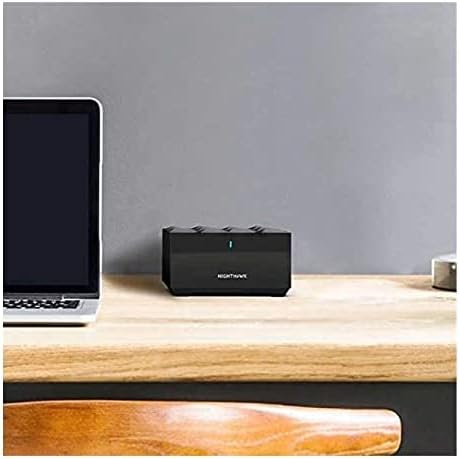
| Feature | Specification |
|---|---|
| Brand | NETGEAR |
| Model Name | MK6W |
| Wireless Communication Standard | 802.11ax (Wi-Fi 6) |
| Frequency Band Class | Dual-Band |
| Advertised Coverage Area | Up to 4,500 square feet |
| Advertised Speed Capability | Internet speeds over 100Mbps |
| Special Hardware Features | WPS button pairing, EasyMesh compatible |
| Included Hardware | 1 Router, 2 Satellites, 1 Ethernet cable |
| Device Compatibility | Personal Computer |
| Color | Black |
Whole-Home Coverage and Satellite Distribution
The standout physical attribute of this package is its generous coverage allowance. The system is designed to provide whole-home coverage across areas measuring up to 4,500 square feet. Rather than relying on a solitary broadcast tower tucked next to an internet modem in the corner of your home, this kit splits the workload among three distinct physical units: one main router and two satellite stations. This multi-node design means the netgear mk6w coverage spans across rooms, levels, and distant corners that single-box setups usually leave behind.
Understanding how the netgear mk6w satellite range functions in daily life is essential for first-time buyers. The main router connects directly to your internet service feed, while the two satellite units can be placed throughout your home where reception normally fades. By distributing these nodes, the system creates an overlapping network fabric. Devices such as laptops, tablets, and phones pass between the router and satellites without forcing you to manually switch network names. If you have previously considered simpler options like a basic Google WiFi mesh setup, the MK6W provides an expanded three-piece configuration ready to tackle larger square footage right from the start.
While the product listing specifies the overall package reach of 4,500 square feet, it does not specify the individual square-footage rating for a single satellite on its own. In practice, placing one satellite on a middle floor and another near a garage or remote office ensures that the netgear nighthawk wifi 6 mesh for home delivers balanced coverage across your entire living area. The satellites work together with the main router to maintain steady signal paths, minimizing the sudden dropouts that plague homes with multiple walls and structural partitions.
Setup and Usability for Beginners
Setting up home networking equipment can feel intimidating for newcomers, but modern mesh systems strive to make installation approachable. The nighthawk mesh wifi 6 system setup process is built around straightforward physical connections. The box provides everything required to establish the primary link, including the router unit, two satellites, and an Ethernet cable to join the router to your existing internet provider’s modem. Because the hardware uses industry-standard EasyMesh compatibility, the devices are designed to coordinate with one another seamlessly right out of the box.
One particularly convenient feature highlighted in the hardware specifications is the inclusion of WPS (Wi-Fi Protected Setup). WPS allows you to connect compatible peripherals to your wireless network simply by pressing a physical button rather than typing complex passwords on tiny screens. This is especially helpful when adding home hardware like wireless printers, smart plugs, or security accessories:
- Press the WPS button on the MK6W hardware to open a temporary connection window.
- Press the corresponding connection button on your peripheral device.
- The two devices securely exchange security keys automatically without manual passphrase entry.
This beginner-friendly approach makes mesh wifi 6 for beginners much less stressful than the older generation of networking hardware. The listing does not specify whether a mobile app is required for initial configuration or if a standard web browser interface is preferred, but the inclusion of push-button WPS pairing and standardized EasyMesh support indicates that basic connectivity is prioritized for everyday homeowners.
Dual-Band Performance and Gaming Capabilities
Underneath the exterior casing, this system relies on the 802.11ax wireless communication standard, commonly known as Wi-Fi 6. Compared to older wireless standards, Wi-Fi 6 is engineered to handle multiple connected gadgets simultaneously without choking the connection. The netgear mk6w dual band performance operates across two distinct wireless frequency bands: the 2.4 GHz band, which travels farther through interior walls, and the faster 5 GHz band, which provides greater throughput for high-demand tasks closer to the nodes.
The manufacturer listing specifically highlights that this system is recommended for gaming and is rated for internet speeds over 100Mbps. When assessing nighthawk mesh wifi 6 system gaming performance, the combination of dual-band delivery and Wi-Fi 6 efficiency helps keep latency stable. For personal computers and gaming stations, minimizing lag is crucial for fast-paced multiplayer titles. The included Ethernet cable also allows users to establish a direct wired connection from the router to a personal computer for maximum stability, bypassing wireless interference entirely.
Shoppers looking at high-end solutions such as the TP-Link AXE5400 mesh Wi-Fi 6E system will find that those premium alternatives add a third 6 GHz wireless band. By contrast, the MK6W sticks to a streamlined dual-band architecture. For standard residential plans running over 100Mbps, dual-band Wi-Fi 6 remains more than capable of supporting simultaneous video calls, multiple HD video streams, and casual gaming sessions without overwhelming your domestic network.
Hardware Specifications and Compatibility
A closer look at the nighthawk mesh wifi 6 system specs reveals a practical, no-nonsense hardware design. The system features a black finish across all three included nodes, allowing them to rest quietly on shelves, desks, or entertainment centers without drawing excessive visual attention. In the box, buyers receive the central router, two satellite units, and the necessary Ethernet cable to get the core network operational.
In terms of compatibility, the listing notes direct support for personal computers. Because the underlying technology is universal 802.11ax Wi-Fi, the network is naturally backward-compatible with standard Wi-Fi devices, though the listing does not specify detailed software compatibility lists for specific mobile operating systems. Additionally, while an Ethernet cable is included in the packaging, the product data does not specify the exact count or speed rating of the Ethernet ports located on the back of each satellite or the router itself.
Overall, the hardware package is designed to deliver a turnkey physical solution. Rather than forcing shoppers to calculate how many separate extenders they need to buy, Netgear packages the primary router together with two satellites in one box. This provides a complete hardware foundation suitable for multi-room homes seeking a unified network foundation.
Netgear Nighthawk MK6W Pros and Cons
Two swatches, side by side. Everything on both sides is read from the product listing and from buyer feedback on Amazon – nothing here comes from handling the product.
What works
- Covers homes up to 4,500 square feet
- Modern 802.11ax Wi-Fi 6 technology
- Includes router plus two satellites
- Convenient push-button WPS pairing
- EasyMesh compatible for simple networking
What to check
- Dual-band design lacks dedicated third backhaul
- Listing does not specify physical port count
- Available only in black finish
Who Should Buy the Netgear Nighthawk MK6W
Buy It If
- You need to cover a large living space of up to 4,500 square feet and want a comprehensive three-piece hardware bundle in a single package.
- You have an internet connection running over 100Mbps and want modern Wi-Fi 6 capabilities for personal computers and gaming.
- You appreciate simple device pairing methods, including a physical WPS button and EasyMesh compatibility.
- You prefer a discreet, uniform black hardware design that matches conventional consumer electronics.
Skip It If
- You subscribe to multi-gigabit internet service and require a dedicated third wireless backhaul band to maximize top-tier speeds.
- You require light-colored or white equipment to blend seamlessly with pale walls and modern minimalist decor.
- You need to verify the exact number of physical Ethernet ports on satellite units prior to purchase, as the listing does not specify port counts.
Final Verdict
When asking whether the is nighthawk mesh wifi 6 system worth it, the answer depends largely on the size of your home and your everyday networking demands. If your goal is to eliminate frustrating dead spots across a spacious layout of up to 4,500 square feet, the MK6W provides an effective, beginner-accessible pathway. By combining a main router with two matched satellite nodes, it provides complete home coverage without requiring you to purchase piecemeal extenders or navigate confusing configuration menus.
While power users with extreme bandwidth requirements may miss having a dedicated third wireless band, the Netgear Nighthawk MK6W focuses on core reliability. With support for internet speeds over 100Mbps, modern 802.11ax efficiency, convenient WPS button connectivity, and EasyMesh compliance, this system serves as a solid, practical solution for families and gift recipients seeking dependable whole-home Wi-Fi.
FAQ
How much area does the Netgear Nighthawk MK6W cover?
According to the official product specifications, the Netgear Nighthawk MK6W covers areas measuring up to 4,500 square feet using its included three-piece bundle of one router and two satellite stations.
What components are included in the box?
The package contains the central router, two satellite units, and an Ethernet cable to link the router directly to your internet modem or a personal computer.
Is the Netgear Nighthawk MK6W suitable for online gaming?
Yes, the manufacturer listing explicitly recommends this system for gaming, leveraging 802.11ax Wi-Fi 6 wireless technology and dual-band transmission to deliver stable connections for internet speeds over 100Mbps.
Does this mesh system feature a WPS button?
Yes, WPS is highlighted as a special feature on this model, enabling quick, push-button pairing for compatible wireless devices without manual password entry.
Can I use this mesh system with personal computers?
Yes, personal computers are explicitly listed as compatible devices, and the system can connect to them wirelessly via Wi-Fi 6 or over a physical connection using an Ethernet cable.
Prices and specifications above are read from the product page and can change without notice. The score is the average left by Amazon buyers; nothing on this page comes from handling the product.


