As Amazon Associates, we earn from qualifying purchases. This means we may receive a small commission at no extra cost to you if you click through and make a purchase.
As an Amazon Associate we earn from qualifying purchases. Links on this page are affiliate links.
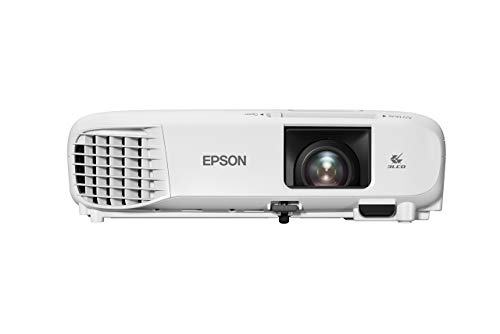
This epson powerlite e20 LCD projector review covers a compact display unit designed for presentations and basic playback. The hardware features 3LCD technology and a native 4:3 aspect ratio. It also provides a 12,000-hour lamp life and HDMI connectivity for video and audio transfer over a single cable. At 5.95 pounds, the white chassis measures 3.4 by 11.8 by 9.8 inches and supports ceiling mounting. You get a built-in 5-watt speaker directly inside the casing. These published specifications outline a straightforward setup built for long runtime and simple media delivery.
- 3LCD display technology for vibrant images
- Lamp life rated up to 12,000 hours
- Single-cable audio and video transfer via HDMI
- Integrated 5-watt speaker
- Ceiling-mountable chassis weighing 5.95 pounds
Good fit for
This projector fits classrooms, meeting spaces, and training rooms that run legacy 4:3 presentations or documents. You benefit from the 12,000-hour lamp life if you run daily instructional sessions without frequent maintenance. Its 5.95-pound weight and ceiling-mountable design suit fixed overhead installations or shared office carts. The single HDMI input and built-in 5-watt speaker handle simple multimedia delivery without requiring external audio hardware.
Who can skip it
You should skip this model if you need a native 16:9 widescreen display for modern movies or widescreen video formats. The 4:3 aspect ratio will letterbox widescreen signals. You should also look elsewhere if your room requires high-volume audio, as the built-in speaker provides only 5 watts of output. Dedicated home theater users and large lecture halls will want hardware with different native dimensions and higher audio capacity.
Verdict
The Epson PowerLite E20 delivers a dedicated 4:3 presentation display with durable 12,000-hour lamp longevity and integrated audio. It serves classrooms and offices that prioritize straightforward HDMI connectivity and standard ceiling-mount deployment.
Key Specifications and Practical Meanings
5-watt speaker
A 5-watt speaker produces basic audio directly from the chassis without external hardware. You get sufficient sound output for quiet meeting rooms or small classrooms. This suits educators and presenters who need a self-contained setup on the move. When shopping for projectors or TVs, compare this output to models offering 10-watt drivers or dedicated audio-out ports for larger spaces.
5.95 pounds
At 5.95 pounds, this unit is light enough to transport between rooms in a backpack or carry case. You can relocate your display without physical strain. This benefits mobile professionals, travelling tutors, and shared office spaces. When comparing projectors, evaluate this weight against heavier fixed-installation units exceeding ten pounds or ultra-portable pocket projectors under three pounds to match your mobility needs.
Ceiling Mountable
A ceiling mountable design allows inverted overhead installation using standard brackets. You save desk space and eliminate cord clutter across presentation floors. This feature suits dedicated training rooms, lecture halls, and permanent conference rooms. When shopping for display equipment, compare ceiling-capable projectors with tabletop-only units or wall-mounted flat-panel TVs, which require dedicated wall space and distinct viewing distance considerations.
3.4" x 11.8" x 9.8"
These physical dimensions define a compact desktop footprint. At 3.4 inches tall, the unit sits low on tables and avoids blocking line of sight for seated viewers. You benefit if you work in compact conference rooms or small classrooms with limited tabletop space. When evaluating projectors and TVs, compare these measurements against bulkier chassis options that demand larger AV carts or wide credenzas.
Design and Build Specifications
The Epson PowerLite E20 comes in a clean white finish designed to suit professional classrooms and offices. According to the listing, the projector measures 3.4 inches high, 11.8 inches wide, and 9.8 inches deep. The specifications also report dimensions of 14 inches wide, 6 inches high, and 15 inches long. At 5.95 pounds, the unit remains lightweight and easy to handle. You can lift and carry the projector between different conference rooms or transport it off-site without significant physical effort.
For room placement, the projector is ceiling mountable. This lets you mount the unit overhead on a dedicated bracket, which keeps meeting tables clear of equipment and wiring. According to the listing, the chassis features a durable design and flexible construction, making it practical to project from virtually anywhere in your space. The listing specifies no onboard controls or housing materials beyond the white finish. Instead, the physical build emphasizes a functional layout focused on standard tabletop use and overhead installation. These dimensions and weight specifications make the hardware a practical fit if you need to share one projector across multiple presentation rooms.
Setup Process and Daily Operation Specs
Setting up the Epson PowerLite E20 centers on flexible room placement. The white chassis is ceiling mountable, which allows you to install it overhead in a permanent location. Because the projector weighs 5.95 pounds, you can also place it on a desk or cart for temporary sessions. Epson highlights a flexible construction that makes it easy for you to project clear media from virtually anywhere in a room.
Connecting your presentation hardware involves a quick setup process. The projector features HDMI connectivity, which transfers video and audio through a single cable. You can attach a computer, media player, or other digital source without routing separate sound wires. This single-cable setup feeds directly into the projector, utilizing the built-in 5-watt speaker for your audio needs alongside the projected video feed.
In everyday use, the unit provides straightforward operation backed by durable components. Its durable design delivers a long lamp life of 12,000 hours, keeping regular maintenance down over years of use. The 3LCD display technology produces vibrant, true-to-life images for charts, text, and video. Because the hardware operates with a native 4:3 aspect ratio, you can display traditional slides and standard educational materials without resizing your files.
Epson PowerLite E20 Buying Considerations
Before choosing the Epson PowerLite E20, consider your connected equipment and media formats. The unit uses HDMI connectivity to transfer video and audio through a single cable, so you will need a compatible HDMI source device. If you plan an overhead setup, verify that you have suitable ceiling mounting hardware to support the 5.95-pound white chassis. Format compatibility is also essential to evaluate. The projector features a native 4:3 aspect ratio, which matches standard presentation slides rather than modern widescreen formats. For routine upkeep, the durable design delivers a lamp life of 12,000 hours before replacement is required. Along with the other 1 choices in TVs & Projectors for 2026, this 3LCD model suits users who specifically require standard-aspect projection.
Check before you buy
- Ensure your source hardware supports video and audio output over an HDMI connection.
- Confirm your display screen and media match the native 4:3 aspect ratio.
- Check ceiling mount support for the 5.95-pound chassis if installing it overhead.
- Assess whether the 12,000-hour lamp life accommodates your long-term usage schedule.

Epson PowerLite 3LCD Projector
Best for: legacy 4:3 classroom and conference room presentations
- Display Technology
- 3LCD
- Dimensions
- 15 × 14 × 6 inches
- Weight
- 5.95 pounds
The Epson PowerLite E20 is a 3LCD projector built for standard-format displays. It projects in a native 4:3 aspect ratio and features a 12,000-hour lamp life. You get HDMI connectivity to pass video and audio, along with a built-in 5-watt speaker. This unit suits you if you need a 5.95-pound, ceiling-mountable display for slides and documents.
- 3LCD display technology
- Lamp life rated up to 12,000 hours
- Single HDMI port carries both video and audio
- Ceiling-mountable chassis weighing 5.95 pounds
- Native 4:3 aspect ratio limits widescreen content
- Integrated speaker output capped at 5 watts
- You display legacy 4:3 presentations or instructional slides.
- You want a ceiling-mountable projector with low lamp maintenance.
- You require a native 16:9 widescreen format for movies or modern video.
- You need loud sound output without attaching external speakers.
Verdict: Epson PowerLite E20 3LCD Projector delivers dedicated 4:3 format projection for classrooms and offices running standard-ratio slide decks. Its 12,000-hour lamp life reduces servicing needs in fixed ceiling installations.
Specifications side by side
| Spec | Epson PowerLite 3LCD Projector |
|---|---|
| Display Technology | 3LCD |
| Dimensions | 15 × 14 × 6 inches |
| Weight | 5.95 pounds |
| Size | 3.4" x 11.8" x 9.8" |
| Color | White |
| Model | V11H981020 |
Frequently asked questions
What is the native aspect ratio of the Epson PowerLite E20?
The Epson PowerLite E20 features a native 4:3 aspect ratio. This square-format projection matches standard presentation decks and educational materials. When you connect widescreen 16:9 sources, the projector displays black bars above and below the image to maintain correct proportions without stretching the picture.
How long does the lamp last on the Epson PowerLite E20?
The projector offers a lamp life rated up to 12,000 hours. This rating provides extensive operational longevity before you need to swap out the bulb. In educational spaces or business meeting rooms running standard daily presentations, a 12,000-hour lifespan allows years of steady operation with minimal maintenance demands.
What projection technology does the Epson PowerLite E20 use?
The Epson PowerLite E20 utilizes 3LCD display technology. Unlike single-chip DLP systems that use spinning color wheels, 3LCD projection splits light across three individual chips for red, green, and blue. This architecture delivers consistent color output and eliminates the visible rainbow artifacts that can sometimes distract viewers during high-contrast presentations.
What is the model number of the Epson PowerLite E20?
The manufacturer model number for the Epson PowerLite E20 is V11H981020. You can use this specific identifier when searching for compatible mounting hardware, replacement lamps, or official technical manuals. Checking the V11H981020 code ensures you match the correct hardware accessories to your specific display unit.
How much does the Epson PowerLite E20 weigh?
The Epson PowerLite E20 weighs 5.95 pounds. This manageable weight makes the unit easy to carry between shared conference spaces or relocate across classrooms. The relatively light chassis also simplifies overhead installation, as it places minimal physical strain on ceiling mounts and suspension brackets.
What are the chassis dimensions of the Epson PowerLite E20?
The projector chassis measures 3.4 inches high, 11.8 inches wide, and 9.8 inches deep. These compact dimensions allow you to set the projector on shallow media carts, small presentation tables, or ceiling brackets without taking up excess room. The white casing fits neatly into standard commercial or academic environments.
See also
Prices and specifications above are read from the product page and can change without notice. Scores are out of 10, based on listed specifications and buyer feedback; nothing on this page comes from handling the product.


