
As Amazon Associates, we earn from qualifying purchases. This means we may receive a small commission at no extra cost to you if you click through and make a purchase.
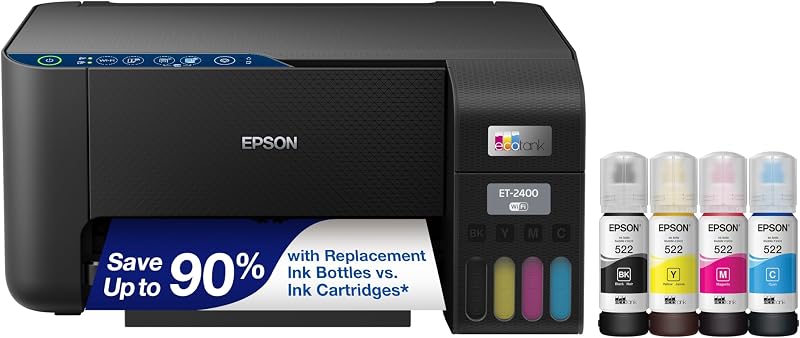
The Epson EcoTank ET-2400 is an all-in-one color inkjet printer engineered to replace traditional plastic cartridges with high-capacity, refillable ink reservoirs. Designed from the ground up for straightforward document processing, this entry-level supertank unit combines printing, copying, and flatbed scanning into a compact frame that eliminates the recurring hassle and frequent maintenance cycles associated with standard cartridge replacements.
This desktop machine is well suited for students, families, remote workers, and first-time printer buyers seeking an uncomplicated household tool for school assignments, utility forms, recipes, and personal craft projects. Shoppers searching for a reliable holiday or housewarming gift will appreciate its accessible operation, while power users requiring high-speed automated multi-page scanning, dual paper trays, or dedicated commercial-grade document feeds should look elsewhere in the supertank category.
Epson EcoTank ET-2400 at a Glance
| Feature | Specification |
|---|---|
| Device Type | Color all-in-one inkjet printer |
| Core Functions | Print, copy, and scan |
| Ink Delivery System | Refillable supertank with keyed EcoFit bottles |
| Included Ink Yield | Up to 4,500 black pages and 7,200 color pages |
| Ink Longevity Claim | Up to 2 years of ink in the box |
| Replacement Ink Series | T522 ink bottles |
| Black Copy Speed | Up to 10 pages per minute |
| Scanner Style | High-resolution flatbed scanner |
| Paper Handling | Single rear-feed input tray holding up to 100 sheets |
| Supported Print Media | Plain paper |
| Connectivity and Control | Wired, wireless, mobile app control, and Android controller |
| Dimensions and Weight | 22.8 inches deep by 14.8 inches wide by 10 inches high; 8.6 pounds |
Cartridge-Free Printing and EcoFit Ink Refills
The defining aspect of the Epson EcoTank ET-2400 is its cartridge-free printing architecture. Rather than relying on small, sealed plastic cartridges that run out rapidly and require frequent replacement, this printer integrates four built-in tanks positioned right on the front corner of the machine. The product data notes that each included replacement set of Epson EcoFit ink bottles supplies an ink volume equivalent to approximately 80 individual cartridges. This massive reservoir capacity dramatically minimizes maintenance interruptions, allowing families and students to complete prolonged academic terms or demanding projects without constantly checking ink levels.
Filling the supertank reservoirs is straightforward and clean, making the machine exceptionally friendly for beginners who may feel intimidated by liquid ink. Epson utilizes proprietary EcoFit ink bottles engineered with unique, color-coded mechanical keys. Each bottle only fits into its matching reservoir slot, preventing accidental color mixing. The bottles dock securely onto the tank mouth without requiring squeezing, transferring ink smoothly and stopping automatically once the chamber reaches full capacity. By doing away with disposable cartridge mechanisms entirely, the system helps reduce cartridge waste ending up in landfills, creating an environmentally considerate home workspace.
Longevity is another core highlight emphasized by the manufacturer. The unit ships with up to two years of ink in the box based on routine consumer print volumes, delivering up to 4,500 crisp black-and-white pages and 7,200 vibrant color pages before replenishment is required. When the time eventually comes to refill, the printer takes standard T522 replacement ink bottles. For households comparing different supertank formats across the brand catalog, models like the Epson EcoTank ET-2800 wireless color all-in-one cartridge-free supertank printer with scan and copy share this refillable fluid philosophy, giving everyday consumers a dependable alternative to disposable plastic print heads.
Print Quality and Daily Document Output
Beneath its outer casing, the printer uses Micro Piezo Heat Free technology to produce crisp, legible text and colorful graphics. Unlike thermal inkjet systems that depend on heating elements to boil and propel liquid ink droplets onto the page, heat-free piezo crystals vibrate under electrical signals to eject ink droplets with physical precision. This mechanism operates without heat, supporting steady mechanical reliability across long print runs while contributing to the unit Energy Star compliance. Text documents emerge with sharp character edges, making school essays, shipping labels, and financial statements clean and easy to read.
Color output capabilities make this printer versatile enough for daily family crafts, educational charts, greeting cards, and recipe cards. While specialized creative studios often look to wide-format creative devices like the Epson EcoTank Photo ET-8550 for dedicated gallery reproductions, the EcoTank ET-2400 produces impressive color graphics and standard photos on virtually any standard paper type. The listing highlights plain paper as the primary supported print medium, so users should anticipate that daily printing is optimized for standard household paper stocks rather than specialty heavy canvas or fine art boards.
Paper management is handled through a single rear-feed input tray designed to support larger printing tasks without interruption. The tray holds up to 100 sheets of plain paper in a single loading session, allowing users to queue up multi-page essays, tax returns, or multi-chapter reading packets without constantly reloading paper. The upright rear-feed path utilizes gravity to guide sheets into the internal carriage smoothly, which helps minimize mechanical sheet misfeeds during ordinary household printing chores.
Wireless Setup and Mobile App Management
Setting up a wireless printer can often feel overwhelming for non-technical users, but the manufacturer designs this device with accessible connectivity in mind. The printer integrates wireless and wired networking features, allowing it to connect with laptops, desktop personal computers, tablets, and smartphones. Powered by an internal single processor architecture and an integrated Android controller system, the printer communicates seamlessly with smart devices throughout the home network, enabling any family member to send files from their own desk or couch.
Mobile device management functions through a dedicated smart control application. Using the mobile app, beginners can configure network credentials, monitor ink levels, run routine maintenance checks, and execute print jobs directly from a smartphone or tablet screen. This direct app-based command structure replaces the need for a complicated on-machine physical display panel. Users who prefer managing devices through intuitive phone touchscreens will find the mobile layout straightforward, though gift-buyers should note that those who prefer navigating on-device physical color screens will rely primarily on external device screens and basic button indicators for hardware feedback.
The compact footprint of the chassis makes wireless placement flexible throughout the house. Measuring 22.8 inches deep by 14.8 inches wide and 10 inches high, and weighing a modest 8.6 pounds, the device fits comfortably on a home office desk, dorm room shelf, or credenza. Because it does not require a permanent tether to a desktop PC, you can place it in a central hallway alcove or shared study room where every family member can share its printing, copying, and scanning functions wirelessly.
Copy and Scan Features for Everyday Home Tasks
Beyond standard page printing, the unit provides comprehensive copy and scan capabilities that address everyday home administration. The built-in flatbed scanner features a high-resolution glass platen located beneath the top lid. This flatbed design is ideal for capturing delicate or bound originals that cannot be fed through rollers, such as vintage family photographs, passports, driver licenses, receipts, and pages directly out of textbooks or spiral notebooks.
When quick physical duplicates are needed, the integrated monochrome copy function operates at maximum speeds of up to 10 pages per minute. This swift output allows parents and students to produce duplicate worksheets, contracts, or reference handouts quickly. Those exploring stepped-up multi-function supertank machines like the Epson Eco Tank 4800 will note that while higher-tier office machines frequently incorporate automatic document feeders for batch copying, this home-oriented model relies entirely on manual glass placement for its scanning and copying tasks.
Handling multi-page jobs one sheet at a time on the flatbed glass keeps the overall device footprint compact and mechanically simple, reducing the number of moving parts that could potentially jam or wear out. For households that primarily scan occasional receipts, student permission slips, or single-page identity documents, the flatbed glass provides reliable digital image reproduction without complicated configuration menus.
Epson EcoTank ET-2400 Pros and Cons
Two swatches, side by side. Everything on both sides is read from the product listing and from buyer feedback on Amazon – nothing here comes from handling the product.
What works
- Up to two years of ink included in box
- High page yield reaching 7,200 color pages
- Mess-free EcoFit ink bottle refilling system
- Compact lightweight design weighing only 8.6 pounds
- Energy Star certified with heat-free printing technology
What to check
- No automatic document feeder for multi-page scanning
- Print media listing focused primarily on plain paper
- Physical display screen omitted in favor of app controls
Who Should Buy the Epson EcoTank ET-2400
Buy It If
- You want to eliminate disposable ink cartridges in favor of high-yield T522 refillable ink tanks that provide up to two years of ink in the box.
- You need a lightweight, 8.6-pound all-in-one machine that combines printing, copying, and flatbed scanning in a compact desktop profile.
- You plan to print standard homework assignments, recipes, and home office documents primarily on plain paper stocks using a 100-sheet rear paper tray.
- You prefer initiating print jobs wirelessly from smartphones, tablets, and laptops using an intuitive mobile application.
Skip It If
- You regularly process massive, multi-page document stacks that require an automatic document feeder rather than a manual single-sheet flatbed scanner.
- You need an integrated color touch display screen directly on the physical hardware for standalone menu navigation.
- Your workflow requires rapid office-grade double-sided mechanical duplexing or advanced specialized glossy photo media handling.
Final Verdict
The Epson EcoTank ET-2400 represents a practical, beginner-friendly entry point into cartridge-free printing. By pairing a spacious 100-sheet rear paper tray and a high-resolution flatbed scanner with an ultra-high-yield ink tank system, this all-in-one machine resolves the single biggest complaint home printer owners face: running out of ink at critical moments. The inclusion of EcoFit keyed bottles capable of producing up to 4,500 black and 7,200 color pages ensures that new owners can complete school semesters and daily household tasks without worrying about immediate ink replacement cycles.
While power users in fast-paced corporate environments will notice the absence of an automatic document feeder or an on-unit color LCD display, those deliberate design choices help keep the machine lightweight, energy efficient, and mechanically dependable. For students, households, remote workers, and gift-givers seeking a low-maintenance home workhorse that handles everyday printing, copying, and scanning with zero cartridge waste, this supertank printer delivers outstanding everyday utility and lasting peace of mind.
FAQ
Does the Epson EcoTank ET-2400 use traditional ink cartridges?
No, this model does not use traditional ink cartridges. It features an innovative cartridge-free supertank design with built-in high-capacity ink chambers that you refill directly using Epson EcoFit liquid ink bottles.
How much ink comes in the box with the printer?
The printer includes up to two years of ink in the box based on average consumer print volumes. The supplied ink set delivers enough volume to print up to 4,500 black-and-white pages and up to 7,200 color pages.
What type of replacement ink bottles does this printer take?
The unit uses genuine Epson T522 replacement ink bottles, which feature specially keyed nozzles designed to fit only into their corresponding color reservoirs to prevent spills and accidental color mixing.
Can I print wirelessly from my smartphone or tablet?
Yes, the printer supports wireless connectivity across laptops, desktop PCs, tablets, and smartphones. Mobile management and printing tasks can be handled directly through the compatible mobile application using an Android controller system.
Does this printer feature an automatic document feeder for scanning multi-page files?
No, the listing specifies that scanning and copying are handled via a high-resolution flatbed scanner. Documents and photos must be placed manually on the glass scanner platen one sheet at a time.
Prices and specifications above are read from the product page and can change without notice. The score is the average left by Amazon buyers; nothing on this page comes from handling the product.


