As Amazon Associates, we earn from qualifying purchases. This means we may receive a small commission at no extra cost to you if you click through and make a purchase.
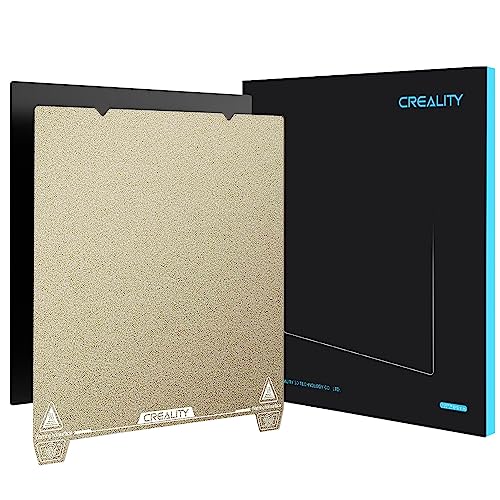
When starting out with desktop 3D printing, few things cause more frustration than trying to unstick a finished model from a rigid platform, which is where the Creality Ender 3 S1 Build Plate proves to be a game-changing addition for your ender 3 s1 pro. Designed as a flexible, magnetic platform made of durable spring steel, this plate allows users to pop completed objects off with a gentle flex rather than hacking away with sharp scraping spatulas. In short, it is an essential, reliable surface that removes the intimidation factor from post-print cleanup and keeps your print bed completely flat over hundreds of operating hours.
This drop-in surface suits beginners, gift recipients getting started with their first printer, and hobbyists who want a hassle-free ender 3 s1 pro bed replacement that prioritizes physical safety and straightforward part release. It is particularly ideal if you regularly switch between filaments or dread the prospect of gouging an expensive aluminum heat plate during model extraction. However, makers who frequently run technical industrial filaments requiring continuous print platform heat exceeding the 70°C limit of the included magnetic base should look elsewhere or choose an alternative adhesion solution rated for extreme thermal loads.
Creality Ender 3 S1 Build Plate at a Glance

| Attribute | Detail |
|---|---|
| Manufacturer | Creality 3D |
| Item Model Number | 3D-PEI 235-3S1 Black |
| Plate Dimensions | 235 x 235 mm |
| Package Dimensions | 10.43 x 9.84 x 0.51 inches |
| Item Weight | 1.17 pounds |
| Core Material | High-elasticity spring steel |
| Magnetic Base Heat Rating | Up to 70°C for long-term heating |
| Supported Filaments | PLA, PETG, ABS, PEEK, and similar |
| Safety Features | Double pull handles and smooth R-angle corners |
| Hardware Alignment | Dual positioning notch holes |
Effortless Print Removal and Spring Steel Elasticity
For any newcomer operating an ender 3 s1 pro for beginners, the hardest step of a print job is often getting the item off the machine once cooling finishes. Traditional glass or glued sheets require metal putty knives, which run the risk of personal hand injuries or gouging the print surface. The core innovation of this creality pei spring steel sheet is its natural spring elasticity. Once the print cycle concludes, you lift the sheet by its tabs, hold both sides, and give it a slight inward bend. The printed object releases instantly, often with an audible snap, without needing tools.
The resilience of the steel core prevents permanent bending or warping. Creality manufactures this sheet from high-grade spring steel engineered to endure repeated flexing without losing its original flat profile. Inferior steel sheets can buckle or retain a permanent curve after wrestling with a stubborn model, which ruins your first-layer calibration for future jobs. This plate snaps straight back into true flatness every time, ensuring your bed leveling values remain consistent from one build to the next.
Beyond convenience, removing your models off the machine protects your printer hardware. Forcing a scraper against an attached build platform puts heavy mechanical torque on the Y-axis guide rails and eccentric nuts. Over time, that physical force can knock the bed assembly out of tram or loosen structural bolts. By lifting this flexible ender 3 s1 pro build plate free from the chassis before flexing it, all peeling stress is isolated in your hands rather than transferred to the printer frame.
First-Layer Adhesion and Broad Material Compatibility
First-layer adhesion dictates whether a print succeeds or becomes a tangled ball of plastic spaghetti. This ender 3 s1 pro pei sheet provides strong molecular grip when hot, ensuring molten plastic anchors firmly to the bed during the critical first layer. The micro-textured coating delivers a clean, matte finish to the underside of parts, hiding the layer paths and providing a professional look straight off the printer. Once the bed temperature drops back down to room level, the bond weakens naturally, making part detachment effortless.
Versatility is another major benefit, as this platform handles everyday standard materials alongside advanced plastics. The official creality ender 3 s1 build plate specs verify full compatibility with common filaments like PLA and PETG, while also accommodating ABS and high-performance PEEK. This broad utility allows first-time makers to start on forgiving filaments like PLA and expand into tougher, heat-resistant engineering filaments later on without buying separate plates for each project.
Users should remain mindful of the thermal thresholds outlined in the manufacturer documentation. The included soft magnetic sticker is rated to withstand prolonged work with heated beds up to 70°C without loss of magnetism. While common materials like PLA print well under this threshold, makers working with materials like ABS often set their heated beds above 80°C. For those higher-temperature applications, monitoring magnetic hold over extended cycles is necessary to preserve the adhesive longevity of the base sticker.
Safe Handling, Precise Alignment, and Magnetic Hold
Handling hot print platforms can be hazardous, particularly for hobbyists working in tight spaces or younger students learning digital fabrication. Creality incorporates double front handles on the sheet, providing safe grip tabs that let you lift the platform without contacting the heated printing zone. This simple physical separation prevents accidental burns when clearing the bed immediately after a print finishes, turning plate handling into a quick, intuitive movement.
Proper plate realignment can be finicky on basic magnetic beds, but this design incorporates two precise positioning cutouts along the rear edge. These positioning notches drop directly against the alignment screws on the carriage, ensuring the plate settles into the exact center every time you put it back. The edges also feature an R-angle curved design that eliminates sharp, pointy corners, protecting your fingers, clothes, and wiring cables from snagging during removal and replacement.
Holding the entire assembly rock-steady is a high-flux magnetic backing. Once placed onto the heated bed, the ender 3 s1 pro magnetic bed prevents shifting or slipping caused by the rapid back-and-forth motion of the Y-axis motor. That immovable grip ensures dimensional accuracy on tall prints while still yielding easily whenever you pull upward by the front handles to harvest your work.
Machine Sizing and Multi-Printer Compatibility
Knowing your exact equipment dimensions prevents costly purchasing mistakes. The official ender 3 s1 pro bed size measures 235 x 235 mm, which is identical to the mechanical layout shared across numerous modern Creality desktop machines. Because this build plate matches that specific footprint, it serves as a straightforward drop-in component that requires no trimming, bracket adjustments, or custom bed clips to achieve a snug fit.
This wide physical compatibility makes the plate an excellent spare part across modern workshop fleets. Beyond the S1 Pro, this platform fits the baseline Ender 3 S1, the popular ender 3 v3 se, the Ender 3 V3 KE, the standard Ender 3 V3, the CR-10 SE, and the high-speed ender 5 s1. If you own multiple machines with identical 235 x 235 mm heated beds, keeping one or two of these plates in your drawer provides immediate backup across your entire printing setup.
Older machines can also use this system if they share the same bed dimensions. For instance, hobbyists running a modified creality ender 3pro with a modern magnetic base can utilize this flexible spring steel plate to gain modern alignment notches and front handles. Standardizing around a single flexible sheet makes managing print prep routines and spare hardware far simpler.
Cleaning and Surface Maintenance
Dust, finger oils, and plastic residue will degrade build plate adhesion over time. When considering how to clean ender 3 s1 pro bed surfaces, the key is keeping grease away from the textured coating without using harsh abrasive scrubbers. Skin naturally carries oils that transfer to the bed whenever you touch it, creating slick spots where the first layer fails to stick. Wiping the surface down with isopropyl alcohol on a lint-free cloth between prints keeps the texture clean and tacky.
When heavy residue accumulates after dozens of print jobs, a deeper cleaning is simple. You can wash the detached spring steel plate in a sink using warm water and mild dish detergent that does not contain hand lotions or moisturizers. Gently lather the surface with a soft sponge, rinse thoroughly to eliminate all soap film, and dry it completely before placing it back onto the magnetic base. Avoid steel wool or abrasive scouring pads, as they will scratch the textured coating and diminish its holding strength.
Proper nozzle height maintenance also plays a critical role in preserving the surface. If your Z-axis offset is set too low, the brass or hardened nozzle will gouge directly into the steel sheet, causing permanent cosmetic and mechanical damage. Taking the time to run an automatic bed mesh and setting the correct Z-offset ensures your nozzle deposits plastic onto the textured face without ever dragging across the plate itself.
Creality Ender 3 S1 Build Plate Pros and Cons
Two swatches, side by side. Everything on both sides is read from the product listing and from buyer feedback on Amazon – nothing here comes from handling the product.
What works
- High-elasticity spring steel bends without warping
- Dual handles prevent contact burns
- Rear positioning holes ensure fast alignment
- Rounded R-angle edges improve user safety
- Wide compatibility with common 235x235mm printers
What to check
- Magnetic sticker rated to 70°C max
- Only fits standard 235x235mm beds
Who Should Buy the Creality Ender 3 S1 Build Plate
Buy It If
- You want effortless, spatula-free part removal by simply flexing the spring steel plate.
- You need an authentic, exact-fit replacement plate for an Ender 3 S1 Pro or compatible 235 x 235 mm machine.
- You value built-in safety features like front pull handles, rounded R-angle edges, and rear alignment cutouts.
- You print frequently with everyday materials like PLA, PETG, or ABS and want consistent first-layer grip.
Skip It If
- Your 3D printer uses a build volume that differs from the standard 235 x 235 mm dimensions.
- You regularly run continuous heated bed cycles far above the 70°C long-term rating of the magnetic base.
- You strictly prefer smooth glass beds for an ultra-glossy, mirror-like bottom finish on your prints.
Final Verdict
The Creality Ender 3 S1 Build Plate solves the most common daily annoyance in 3D printing: safely separating finished objects from the machine. By pairing a resilient spring steel core with a grippy textured surface, it gives beginners and veteran hobbyists the confidence to tackle delicate models without risking cracked prints, gouged beds, or sliced fingers. Its precise positioning notches and heat-shielding handles make everyday operation smooth, consistent, and remarkably user-friendly.
While creators working with extreme bed temperatures need to remain mindful of the 70°C rating on the soft magnetic sticker, this plate excels across the vast majority of consumer printing projects. Whether you are replacing a worn-out stock bed or looking for an extra plate to keep printing while your previous project cools, this authentic accessory is a practical, durable, and immensely satisfying upgrade for your workstation.
FAQ
Is ender 3 s1 pro build plate worth it?
Yes, it is well worth the investment for any maker who wants to avoid using sharp metal spatulas. The flexible spring steel construction allows parts to pop off cleanly with a minor bend, protecting both your fingers and the mechanical alignment of your printer.
What is the exact ender 3 s1 pro bed size?
The build plate dimensions are 235 x 235 mm. This standard size matches the heated beds on the Ender 3 S1, Ender 3 S1 Pro, Ender 3 V3 series, Ender 5 S1, and several other popular Creality machines.
How to clean ender 3 s1 pro bed surfaces safely?
Wipe the plate with isopropyl alcohol using a microfiber towel between prints to dissolve finger oils. For thorough maintenance, remove the plate and hand-wash it in warm water with mild dish soap, rinse completely, and dry it thoroughly before returning it to the magnetic sticker.
Does the magnetic sticker handle high bed temperatures?
The manufacturer listing states that the soft magnetic sticker can withstand long periods of operation with heated beds set up to 70°C. For prolonged printing above this temperature, users should periodically check magnetic holding strength.
Do I need tools to remove prints from this plate?
No tools are required. After the print finishes and the bed cools down, you lift the steel plate off the printer by its handles and gently bend it outward, which causes the print to detach cleanly on its own.
Prices and specifications above are read from the product page and can change without notice. The score is the average left by Amazon buyers; nothing on this page comes from handling the product.