
As Amazon Associates, we earn from qualifying purchases. This means we may receive a small commission at no extra cost to you if you click through and make a purchase.
As an Amazon Associate we earn from qualifying purchases. Links on this page are affiliate links.
This elite screens spectrum rc1 remotes review examines an electric motorized projection screen built for large venues and dedicated display setups. Two core specifications define this model: its 180-inch diagonal display area and its classic 4:3 aspect ratio. Measuring 108 inches high by 144 inches wide in viewable area, it uses MaxWhite 2 front projection material with a 1.1 gain and a 180-degree viewing angle. The unit comes fully assembled in a white casing for wall or ceiling mounting. It connects with standard high-definition and ultra-high-definition projectors for theater and presentation use.
- MaxWhite 2 screen material with 1.1 gain and 180-degree viewing angle
- Dual control setup with included infrared (IR) and radio frequency (RF) remotes
- Wall box controller with built-in IR sensor and programmable vertical drop position
- Wired RJ50 port and wireless RF options for 12-volt projector triggers
Good fit for
This screen suits you if you have a spacious room that accommodates a 155.4-inch wide casing and 55-pound unit. It works best for legacy 4:3 video, classic presentations, or commercial displays paired with standard throw HD or UHD projectors. The wide 180-degree viewing angle accommodates broad seating arrangements. Programmable RF remotes also benefit multi-screen environments where you need separate control channels.
Who can skip it
Skip this screen if your primary viewing consists of widescreen 16:9 movies or modern gaming, as the 4:3 format creates large unused borders. You should also avoid this model if you use an ultra-short-throw projector, because the MaxWhite 2 material specifies standard projector compatibility. Finally, rooms with low ceilings or compact wall areas cannot fit its 118.5-inch total height and 155.4-inch casing width.
Verdict
The Elite Screens Spectrum 180-inch 4:3 motorized screen delivers an expansive display area with versatile IR, RF, and 12-volt trigger automation. It is a capable motorized solution for large spaces requiring a high-capacity 4:3 surface for standard-throw projectors.
Key Specifications and Performance Details
Gain: 1.1
A 1.1 gain rating means the fabric reflects slightly more light back toward you than a standard matte white surface. You get a balanced brightness boost without introducing noticeable hot-spotting or narrow sweet spots. This suits viewers in moderately lit rooms who want vibrant projection. When comparing projection screens, contrast this against lower 0.8 gain surfaces designed for dark home theaters or high-gain screens that compromise wide-angle visibility.
Viewing Angle: 180°
A 180-degree viewing angle ensures that picture brightness and color saturation remain uniform from any seat in your room. You can place seating off to the extreme sides without experiencing dimming or image distortion. This benefits hosts setting up wide seating arrangements in auditoriums or spacious media areas. When shopping for screens, compare this against specialized ambient-light-rejecting fabrics, which frequently limit viewing angles to narrower cones around 90 degrees.
Screen Material: MaxWhite 2
MaxWhite 2 is a durable front-projection fabric with full black backing to stop light penetration from behind. You can clean the surface with soap and water without damaging the material. This suits multi-use halls or classrooms where equipment encounters dust or regular handling. When evaluating projection surfaces, compare this cleanable matte screen to delicate acoustic weaves that require specialized brush kits or damage easily.
Mounting Type: Wall Mount, Ceiling Mount
Dual-mounting capability allows you to secure the casing against a vertical wall or hang it from ceiling joists. You can adapt installation to rooms with limited wall space or clear glass partitions. This fits users setting up large screens in multi-purpose or commercial rooms. When shopping for motorized hardware, compare this adaptable casing against ceiling-recessed designs that require cutting drywall or fixed wall-only enclosures.
Housing Design, Screen Materials, and Controls
According to the listing, the screen arrives fully assembled in a white casing measuring 155.4 inches wide, 118.5 inches high, and 3.1 inches deep. The unit weighs 55 pounds. You can install it on a wall or ceiling using the included installation kit. Because of the casing width and 55-pound weight, you need a wide, secure mounting surface with adequate clearance.
The display surface uses MaxWhite 2 front projection material with a fully black backing. According to the listing, this black backing prevents light from penetrating the fabric, helping preserve image contrast during viewing. The material is also easy to clean with mild soap and water, allowing you to maintain the screen surface without specialized cleaning solutions.
For motorized operation, the package provides both infrared and radio frequency handheld remotes, plus a wall box controller with a built-in infrared sensor. The roller mechanism includes a user-friendly programmable vertical drop position, letting you set custom drop limits. Built-in selectable radio frequency channels allow programming different codes to control multiple screens and reduce electrical interference. For automated projector integration, you can use the RJ50 port for a wired 12-volt trigger or connect through the wireless 12-volt radio frequency trigger.
Setup Process and Daily Operation Guide
You receive the unit fully assembled and plug-and-play ready for mounting. The included installation kit lets you secure the casing directly to a flat wall or ceiling surface. Because this model supports standard UHD and HD projectors, you can pair it with 4K, 8K, or active 3D equipment without requiring specialized lenses.
For everyday operation, you can deploy and retract the screen using the included infrared (IR) or radio frequency (RF) remotes. A wall box controller with a built-in IR sensor provides an accessible wall switch option. If you prefer automated control, the RJ50 port connects a wired 12-volt projector trigger. Alternatively, you can use the wireless 12-volt trigger feature through the RF remote to synchronize screen movement directly with your projector's power cycles.
Daily use also benefits from a programmable vertical drop position. This feature allows you to set the exact lower limit so the view area aligns with your projector beam. Selectable RF channels let you assign distinct remote codes to prevent electrical interference or control multiple screens independently. When needed, you can clean the MaxWhite 2 screen surface using mild soap and water.
Before You Buy This Motorized Screen
Before buying this motorized screen, assess your projector hardware and content format. The unit uses a native 4:3 aspect ratio. If you stream modern widescreen video, letterboxing will occur unless you switch to a 16:9 or 16:10 Spectrum model. Ensure your projector uses standard throw projection, as the MaxWhite 2 surface is rated specifically for standard UHD and HD projectors. For installation, verify your wall or ceiling can support a 55-pound load across a 155.4-inch width. You will need an RJ50 cable if you plan to wire the 12-volt trigger directly instead of using the included wireless RF trigger. Upkeep is simple, as the front projection material cleans with basic soap and water. If this 180-inch diagonal display is too large, the series includes smaller sizes down to 84 inches.
Check before you buy
- Confirm your projector uses standard throw projection instead of ultra-short throw.
- Measure your space for the 155.4-inch case width and 118.5-inch overall height.
- Verify your ceiling or wall studs can support the 55-pound total weight.
- Check whether your content fits native 4:3 or needs a 16:9 alternative format.
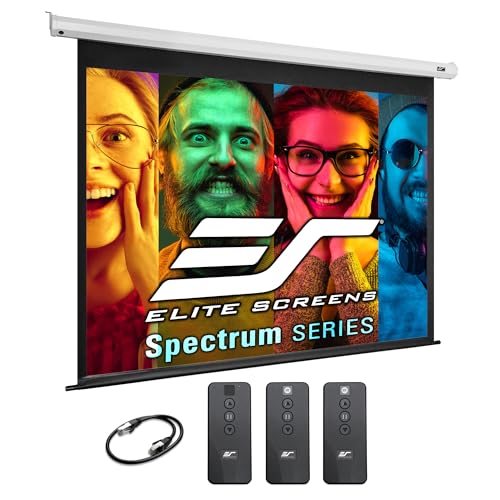
Elite Screens Spectrum 180-Inch 4:3 Motorized Screen
Best for: large presentation spaces showing 4:3 media
- Diagonal Size
- 180"
- Screen Type
- Motorized
- Projector Compatibility
- Standard UHD/HD
- Aspect Ratio
- 4:3
- Screen Material
- MaxWhite 2
- Gain
- 1.1
This motorized projection screen provides a 180-inch diagonal display in a 4:3 aspect ratio. Built with 1.1-gain MaxWhite 2 fabric, it gives you a 180-degree viewing angle for standard UHD/HD projectors. You receive both infrared and radio-frequency remotes, plus 12-volt trigger connectivity, making it suitable for large rooms needing multi-channel motorized control.
- Includes both RF and IR remotes plus wall box controller
- Wide 180-degree viewing angle with 1.1 gain surface
- Supports wired RJ50 and wireless 12-volt projector triggers
- Programmable vertical drop position
- 55-pound total weight requires substantial mounting support
- Square 4:3 aspect ratio causes black bars on standard 16:9 content
- You need a 180-inch diagonal display for 4:3 aspect ratio media.
- You want dual RF and IR control options out of the box.
- You plan to automate screen extension using a projector 12-volt trigger.
- You exclusively watch native 16:9 widescreen video.
- You lack the wall or ceiling structure to hold a 55-pound housing.
Verdict: Elite Screens Spectrum 180-Inch Motorized Screen fits presentation halls and multipurpose rooms needing massive 4:3 projection with flexible remote operation. Its multi-channel RF system and 12-volt integration deliver automated standard-throw viewing across wide seating layouts.
Specifications side by side
| Spec | Elite Screens Spectrum 180-Inch 4:3 Motorized Screen |
|---|---|
| Diagonal Size | 180" |
| Screen Type | Motorized |
| Projector Compatibility | Standard UHD/HD |
| Aspect Ratio | 4:3 |
| Screen Material | MaxWhite 2 |
| Gain | 1.1 |
| Viewing Angle | 180° |
| Mounting Type | Wall Mount, Ceiling Mount |
| Resolution | 8K |
| Use | Home Theater |
| Width | 155 inches |
| Height | 119 inches |
| Weight | 55 pounds |
| Size | 180-inch / 4:3 |
| Color | White |
| Model | ELECTRIC180V2 |
Frequently asked questions
What type of remote control system does the Elite Screens Spectrum use?
The screen features a multi-channel RF system for wireless operation. Radio frequency remotes allow you to control the motorized drop from across the room without maintaining a direct line of sight to the sensor. This setup helps you operate the unit smoothly during multimedia presentations.
How does the 12-volt trigger work on this motorized projection screen?
The 12-volt integration synchronizes the motorized screen directly with your projector power cycle. When you power on your projector, the trigger sends a signal that automatically lowers the screen. Powering down raises the screen into its casing, eliminating the need to press extra remote buttons.
Can you use this motorized screen with 8K projectors?
Yes, the screen material lists compatibility with 8K resolutions. Its smooth surface structure prevents grid distortion or texture interference when you pair it with high-density pixel displays. You can project native 8K, 4K, or high-definition signals without losing sharpness across the massive display area.
What throw distance works best with the Elite Screens ELECTRIC180V2?
The ELECTRIC180V2 model is designed for standard-throw projection systems. Standard-throw lenses focus evenly across the full 180-inch viewing plane from a typical ceiling or rear mount. You should ensure your projector throw ratio matches your room depth to fill the entire surface properly.
Is the Elite Screens Spectrum suitable for home theater setups?
Yes, the manufacturer lists home theater among the primary uses for this motorized model. While its native 4:3 format specifically excels in presentation halls showing legacy media, you can use the large display surface for vintage films, retro gaming, or television broadcasts in dedicated media rooms.
What are the exact product dimensions and weight of this model?
The white motorized unit measures 155 inches wide and 119 inches high, with a total weight of 55 pounds. Knowing these external specs helps you confirm clearance in your room and verify that your ceiling joists or wall studs can safely anchor the structural load.
See also
Prices and specifications above are read from the product page and can change without notice. Scores are out of 10, based on listed specifications and buyer feedback; nothing on this page comes from handling the product.


