
As Amazon Associates, we earn from qualifying purchases. This means we may receive a small commission at no extra cost to you if you click through and make a purchase.
As an Amazon Associate we earn from qualifying purchases. Links on this page are affiliate links.
Selecting the best WXGA projectors requires balancing brightness, display tech, and room size for your venue. A total of 9 products were compared, with picks based strictly on the specifications published on the listings. The ViewSonic WXGA 4000-Lumen DLP Projector leads the group because its 120Hz refresh rate delivers smooth video output for conference rooms and classrooms.
This guide helps you decide which display technology, light source, throw ratio, and mounting option best match your daily presentation space.
Evaluate refresh rates and color output
You should select your projector based on how motion and color are handled. A 3LCD design prevents rainbow artifacts to keep color saturation consistent. If you need responsive frame rates, the DLP ViewSonic PA503W delivers a 120Hz refresh rate for smooth video in classrooms and meeting spaces.
| # | Product | Best for | Price |
|---|---|---|---|
| 1 | ViewSonic WXGA 4000-Lumen DLP Projector Best overall | Moderately lit conference rooms and classrooms | |
| 2 | ViewSonic WXGA Short Throw LED Projector Best led | short-throw presentations in compact meeting spaces | |
| 3 | ViewSonic 5500-Lumen WXGA Laser Projector Best premium | golf simulation in high-ambient-light spaces | |
| 4 | Optoma WXGA Laser Projector Also great | continuous commercial installations and bright rooms | |
| 5 | Epson 3LCD 4000-Lumen WXGA Projector Best budget | bright conference room and classroom presentations | |
| 6 | BenQ WXGA 4000-Lumen Business Projector Also great | Bright meeting rooms needing VGA and HDMI | |
| 7 | ViewSonic WXGA 4000-Lumen Laser Projector Also great | dust-prone classrooms and multi-angle conference room setups | |
| 8 | Epson WXGA 4,000-Lumen 3LCD Projector Also great | bright rooms needing accurate color reproduction | |
| 9 | Optoma WXGA 4200-Lumen Projector Best streaming | streaming-stick presentations in lit rooms |
The best fit for you
- You need smooth video playback in lit meeting rooms – ViewSonic WXGA 4000-Lumen DLP Projector – Its 120Hz refresh rate and 4,000-lumen DLP engine maintain fluid video motion.
- You host presentations inside small or crowded meeting rooms – ViewSonic WXGA Short Throw LED Projector – Its short-throw ratio allows large WXGA image projection from short distances.
- You need maximum brightness for a golf simulator setup – ViewSonic 5500-Lumen WXGA Laser Projector – The 5,500-lumen laser illumination overcomes ambient wash in demanding installations.

ViewSonic WXGA 4000-Lumen DLP Projector
Best for: Moderately lit conference rooms and classrooms
- Resolution
- WXGA
- Brightness
- 4,000 ANSI lumens
- Native Resolution
- WXGA (1280x800p)
- Light Source
- Lamp
- Display Technology
- DLP
- Refresh Rate
- 120Hz
This DLP projector produces native WXGA 1280×800 resolution with 4,000 ANSI lumens of brightness using a conventional lamp. It features a 1.5 to 1.7 throw ratio, 1.1x optical zoom, and vertical keystone correction. With 16ms input latency and a 120Hz refresh rate, it suits you if you need clear presentations or fast motion playback in moderately lit meeting spaces.
- 4,000 ANSI lumens output maintains image clarity in moderate ambient light
- 120Hz refresh rate paired with 16ms input latency reduces motion lag
- Projects images from 80 to 150 inches
- Vertical keystone correction and 1.1x optical zoom for screen alignment
- Uses a traditional lamp rather than a solid-state laser or LED light source
- Requires 11 feet of throw distance to achieve a 100-inch diagonal image
- Optical zoom range is limited to 1.1x
- You need 4,000 ANSI lumens to combat moderate ambient lighting in meeting rooms.
- You display video or interactive content that benefits from 120Hz refresh rates and 16ms latency.
- You mount your projector to a ceiling bracket across a standard throw distance.
- You need a short-throw design to cast large images in compact spaces.
- You prefer a solid-state laser or LED light engine over a lamp.
Verdict: ViewSonic 4000-Lumen WXGA DLP Projector delivers bright 1280×800 presentation output and responsive 120Hz video for classrooms and conference rooms. It serves presenters who need high lumen output and smooth frame rates from standard throw distances.

ViewSonic WXGA Short Throw LED Projector
Best for: short-throw presentations in compact meeting spaces
- Resolution
- WXGA
- Brightness
- 3,000 ANSI lumens
- Native Resolution
- WXGA (1280x800p)
- Light Source
- LED
- Throw Type
- Short Throw
- Use
- Business
This ViewSonic unit provides native WXGA resolution using a solid-state LED light source. Its 0.5 short-throw ratio produces a 100-inch display from 3.5 feet away, making it practical for tight classrooms or meeting rooms. With 3,000 ANSI lumens, a 120Hz refresh rate, and 16ms input latency, you get smooth playback for fast-paced video content without requiring deep throw distances.
- 0.5 short-throw ratio casts a 100-inch image from 3.5 feet away
- Solid-state LED engine with instant power on and off
- 120Hz refresh rate paired with 16ms input latency
- Horizontal and vertical auto-keystone plus 4-corner adjustment
- 3,000 ANSI lumens brightness is lower than typical 4,000-lumen room projectors
- Maximum image size is limited to 150 inches
- You need a large projection display in a shallow room without casting shadows.
- You manage hardware over a network via Crestron, AMX, Extron, or PJ Link.
- You display fast-moving video that benefits from high refresh rates and low latency.
- You present in large, brightly lit spaces that require more than 3,000 ANSI lumens.
- You need an image size greater than 150 inches.
Verdict: ViewSonic LED Short Throw WXGA Projector delivers quick setup and tight-space projection for presenters who need shadow-free multimedia in small meeting rooms.

ViewSonic 5500-Lumen WXGA Laser Projector
Best for: golf simulation in high-ambient-light spaces
- Resolution
- WXGA
- Native Resolution
- WXGA
- Light Source
- Laser
- Use
- Golf Simulation
- Mounting
- Ceiling Mount
- Dimensions
- 11.3 × 8.5 × 5 inches
This ViewSonic display is a laser projector built for high-output environments. It pairs a native WXGA 1280×800 widescreen resolution with a 5,500-lumen laser light source. You get optical zoom, keystone correction, corner adjustment, and ceiling-mount capability. Weighing 6.6 pounds, it suits golf simulation setups and bright spaces where you need strong projection output without lamp replacements.
- 5,500 lumens from a solid-state laser light source
- Native WXGA 1280×800 widescreen display
- Optical zoom, keystone correction, and corner adjustment
- Ceiling-mount design rated for golf simulation use
- Native resolution is capped at WXGA rather than 1080p
- At 6.6 pounds, it is heavier than compact portable projectors
- You need 5,500 lumens of laser brightness for golf simulation or lighted rooms.
- You plan a permanent ceiling mount requiring optical zoom and corner adjustment.
- You require 1080p or 4K resolution for high-detail graphics.
- You want an ultra-lightweight projector for travel.
Verdict: ViewSonic 5500-Lumen WXGA Laser Projector fits ceiling-mounted golf simulators and brightly lit commercial spaces that demand 5,500 lumens of laser illumination over high pixel density.

Optoma WXGA Laser Projector
Best for: continuous commercial installations and bright rooms
- Resolution
- WXGA
- Brightness
- 4000 Lumens
- Native Resolution
- WXGA
- Light Source
- Laser
- Throw Type
- Regular Throw
- Dimensions
- 8.5 × 10.8 × 4.5 inches
This Optoma WXGA projector features a 4,000-lumen DuraCore laser light source rated for up to 30,000 hours of operation. You get an IP6X dust resistance rating, a 1.1x optical zoom, and a built-in 15W speaker. It suits you if you need a regular-throw display for bright meeting rooms or continuous 24/7 installations requiring portrait or 360-degree projection.
- 4,000-lumen laser light source rated up to 30,000 hours
- IP6X dust resistance rating for demanding environments
- Built-in 15W speaker for room audio
- Supports 24/7 operation, 360-degree mounting, and portrait mode
- 1.1x optical zoom provides narrow placement flexibility
- Weighs 9.26 pounds, limiting portable use
- You need a 4,000-lumen laser projector for ambient light without lamp changes.
- You require 24/7 continuous operation, portrait mode, or 360-degree mounting.
- You run presentations in environments where dust resistance is essential.
- You need a short-throw projector to produce large images from close range.
- You require extensive optical zoom beyond 1.1x for distant installation points.
Verdict: Optoma WXGA Laser Projector delivers 4,000 lumens and 30,000 hours of laser operation for organizations that run displays throughout the workday. It fits commercial venues, classrooms, and exhibits where dust resistance and portrait or 360-degree mounting are essential.

Epson 3LCD 4000-Lumen WXGA Projector
Best for: bright conference room and classroom presentations
- Resolution
- WXGA
- Brightness
- 4,000 ISO Lumens
- Native Resolution
- WXGA
- Display Technology
- 3-Chip 3LCD
- Dimensions
- 11.9 × 9.3 × 3.2 inches
- Weight
- 5.2 pounds
This Epson projector uses 3-chip 3LCD display technology to deliver WXGA resolution with 4,000 lumens of both color and white brightness. It projects screen sizes up to 300 inches and includes two HDMI ports alongside a built-in speaker. Weighing 5.2 pounds, it suits you if you need a bright display for well-lit rooms and quick portable setups.
- 4,000 lumens of color brightness and 4,000 lumens of white brightness
- 3-chip 3LCD technology eliminates rainbow artifacts
- Scales up to a 300-inch image size
- Dual HDMI ports for connecting computers and media devices
- No built-in wireless or Bluetooth connectivity included
- WXGA native resolution offers less detail than 1080p projectors
- You need 4,000 lumens of brightness to project clearly in lighted rooms.
- You want 3LCD color reproduction without rainbow effects.
- You require dual HDMI inputs to hook up multiple video sources.
- You require integrated wireless casting or Bluetooth audio without adapters.
- You want higher native sharpness than 1280×800 resolution provides.
Verdict: Epson 3LCD 4000-Lumen WXGA Projector suits presenters who need balanced color output and dual HDMI connections in illuminated conference spaces. The unit outputs up to a 300-inch picture for business meetings and classroom presentations.

BenQ WXGA 4000-Lumen Business Projector
Best for: Bright meeting rooms needing VGA and HDMI
- Resolution
- WXGA
- Brightness
- 4000 ANSI Lumens
- Native Resolution
- WXGA
- Use
- Business
- Dimensions
- 16.1 × 13.5 × 6.7 inches
- Weight
- 7.6 pounds
You get a native WXGA business projector designed for well-lit meeting spaces. It delivers 4000 ANSI lumens of brightness alongside a 20,000:1 contrast ratio for readable presentations. Setup features include auto vertical keystone alignment and a retractable foot. Dual connection support covers HDMI and legacy VGA sources, while SmartEco mode cuts lamp power consumption by up to 70 percent.
- 4000 ANSI lumens brightness for lit rooms
- 20,000:1 contrast ratio with Data Review Mode
- SmartEco Mode reduces lamp power use by up to 70%
- Auto vertical keystone and retractable adjustment foot
- Lamp-based light source rather than solid-state laser or LED
- Bulky chassis measuring 16.2 by 13.9 inches
- No built-in speakers listed in specifications
- You need 4000 ANSI lumens to present in lit conference rooms.
- You require both HDMI and legacy VGA inputs for office equipment.
- You want auto vertical keystone alignment for quick table setup.
- You prefer a laser or LED light engine over a replaceable lamp.
- You need built-in speakers without connecting external audio hardware.
Verdict: BenQ 4000-Lumen WXGA Business Projector suits meeting rooms needing high 4000 ANSI lumen output and VGA backwards compatibility. Its lamp-saving mode and auto vertical alignment provide reliable data projection for office presenters.
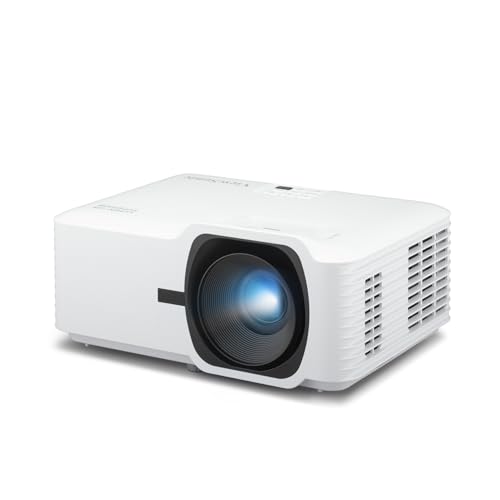
ViewSonic WXGA 4000-Lumen Laser Projector
Best for: dust-prone classrooms and multi-angle conference room setups
- Resolution
- WXGA
- Brightness
- 4,000 ANSI Lumens
- Native Resolution
- WXGA (1280×800)
- Light Source
- Laser Phosphor
- Use
- Business
- Dimensions
- 8.5 × 11.3 × 5.08 inches
This ViewSonic model delivers WXGA (1280×800) native resolution powered by a laser phosphor light source rated for up to 30,000 hours. Its 4,000 ANSI lumens output handles spaces with moderate ambient lighting, while the IP6X sealed optical engine prevents internal dust buildup. It suits you if you need flexible, low-maintenance projection across meeting rooms or classrooms.
- Laser phosphor light source lasts up to 30,000 hours
- 4,000 ANSI lumens brightness overcomes ambient room light
- IP6X dust-resistant sealed engine operates without air filters
- Supports 360-degree rotation and portrait-mode mounting
- Native 1280×800 WXGA resolution provides lower detail than 1080p
- Data lists no integrated speakers for onboard audio playback
- You want a maintenance-free laser light source rated for 30,000 hours.
- You need versatile mounting options including 360-degree and portrait projection.
- You operate in dusty environments that benefit from an IP6X sealed engine.
- You require higher display resolution than 1280×800 WXGA for dense spreadsheets.
- You need built-in audio hardware without hooking up external speakers.
Verdict: ViewSonic WXGA Laser Business Projector gives classroom and meeting room presenters a 4,000-lumen laser engine with dust-sealed optics. It delivers continuous projection for facilities running daily presentations without lamp maintenance.
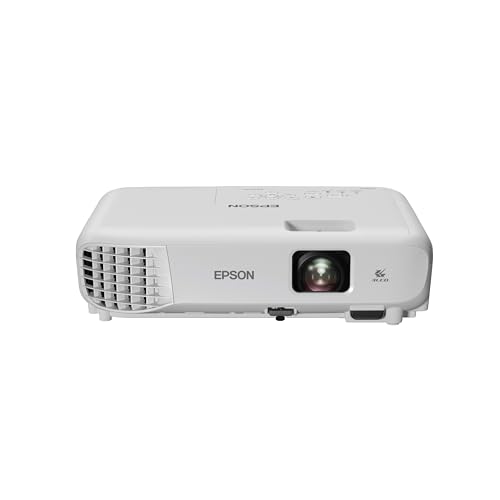
Epson WXGA 4,000-Lumen 3LCD Projector
Best for: bright rooms needing accurate color reproduction
- Resolution
- WXGA
- Brightness
- 4,000 ISO lumens
- Native Resolution
- WXGA
- Display Technology
- 3-Chip 3LCD
- Dimensions
- 11.9 × 9.3 × 3.2 inches
- Weight
- 5.5 pounds
The Epson EX3290 is a WXGA projector built for illuminated spaces. It delivers 4,000 lumens of both color and white brightness using 3-chip 3LCD display technology, preventing rainbow artifacts common to single-chip DLP units. With dual HDMI ports, automatic vertical keystone correction, and a 5.5-pound weight, you get an easily movable display that projects up to 300 inches.
- Equal 4,000 lumens of color and white brightness
- 3-chip 3LCD design eliminates DLP rainbow artifacts
- Automatic vertical keystone alignment via picture skew sensor
- Two HDMI inputs for connecting multiple sources
- 16,000:1 contrast ratio is lower than laser alternatives
- Limited to a 1-year warranty
- Data lists no horizontal keystone adjustment
- You present in bright rooms needing matched color and white brightness.
- You are sensitive to the rainbow effect found on DLP projectors.
- You need two HDMI inputs to switch between video sources.
- You require deep black levels beyond a 16,000:1 dynamic contrast ratio.
- You need horizontal keystone adjustment for an off-center installation.
Verdict: Epson EX3290 3LCD WXGA Projector provides balanced 4,000-lumen output for presenters working in lit rooms. Its 3LCD system ensures consistent color saturation without rainbow artifacts.

Optoma WXGA 4200-Lumen Projector
Best for: streaming-stick presentations in lit rooms
- Resolution
- WXGA
- Brightness
- 4,200 ANSI lumens
- Native Resolution
- WXGA (1280×800)
- Intended Use
- Streaming
- Screen Type
- Portable
- Dimensions
- 12.4 × 9.6 × 3.9 inches
This Optoma WXGA projector delivers 4,200 ANSI lumens of brightness and a native 1280×800 resolution in a 16:10 aspect ratio. You get dedicated USB power to run an HDMI streaming stick directly from the chassis, along with an integrated 10W speaker for standalone audio. It fits you if you need a bright display for presentations or video in lit rooms.
- 4,200 ANSI lumens brightness for ambient-light viewing
- USB power port powers streaming dongles without wall adapters
- Built-in 10W speaker handles room audio
- Vertical keystone correction of ±40 degrees with 1.1x zoom
- Narrow 1.1x optical zoom limits throw flexibility
- Weighs 7.8 pounds, making it bulkier than ultra-portable options
- You plan to use an HDMI streaming stick powered directly by USB
- You need 4,200 ANSI lumens to overcome ambient light in classrooms or offices
- You want built-in 10W audio without bringing external speakers
- You require horizontal keystone adjustment for angled projection
- You need a lightweight unit under five pounds for daily travel
Verdict: Optoma WXGA Streaming Projector suits presenters and educators who want high brightness and direct onboard power for streaming dongles.
Specifications side by side
| Spec | ViewSonic WXGA 4000-Lumen DLP Projector | ViewSonic WXGA Short Throw LED Projector | ViewSonic 5500-Lumen WXGA Laser Projector | Optoma WXGA Laser Projector | Epson 3LCD 4000-Lumen WXGA Projector | BenQ WXGA 4000-Lumen Business Projector | ViewSonic WXGA 4000-Lumen Laser Projector | Epson WXGA 4,000-Lumen 3LCD Projector | Optoma WXGA 4200-Lumen Projector |
|---|---|---|---|---|---|---|---|---|---|
| Brightness | 4,000 ANSI lumens | 3,000 ANSI lumens | – | 4000 Lumens | 4,000 ISO Lumens | 4000 ANSI Lumens | 4,000 ANSI Lumens | 4,000 ISO lumens | 4,200 ANSI lumens |
| Native Resolution | WXGA (1280x800p) | WXGA (1280x800p) | WXGA | WXGA | WXGA | WXGA | WXGA (1280×800) | WXGA | WXGA (1280×800) |
| Light Source | Lamp | LED | Laser | Laser | – | – | Laser Phosphor | – | – |
| Display Technology | DLP | – | – | – | 3-Chip 3LCD | – | – | 3-Chip 3LCD | – |
| Throw Type | – | Short Throw | – | Regular Throw | – | – | – | – | – |
| Resolution | WXGA | WXGA | WXGA | WXGA | WXGA | WXGA | WXGA | WXGA | WXGA |
| Refresh Rate | 120Hz | – | – | – | – | – | – | – | – |
| Intended Use | – | – | – | – | – | – | – | – | Streaming |
| Throw Ratio | – | Short Throw | – | – | – | – | – | – | – |
| Use | Business | Business | Golf Simulation | – | – | Business | Business | – | Business |
| Screen Type | – | – | – | – | – | – | – | – | Portable |
| Mounting | Ceiling Mount | – | Ceiling Mount | – | – | – | – | – | – |
| Dimensions | 4.33 × 11.6 × 8.58 inches | 8.7 × 11.5 × 4.5 inches | 11.3 × 8.5 × 5 inches | 8.5 × 10.8 × 4.5 inches | 11.9 × 9.3 × 3.2 inches | 16.1 × 13.5 × 6.7 inches | 8.5 × 11.3 × 5.08 inches | 11.9 × 9.3 × 3.2 inches | 12.4 × 9.6 × 3.9 inches |
| Weight | 4.85 pounds | 6.28 pounds | 6.6 pounds | 9.26 pounds | 5.2 pounds | 7.6 pounds | 6.83 pounds | 5.5 pounds | 7.8 pounds |
| Size | 4.3" x 8.6" x 11.6" | 4.5" x 11.5" x 8.7" | 5.1" x 11.3" x 8.5" | Regular Throw WXGA | – | – | 5.1" x 11.3" x 8.5" | – | WXGA |
| Color | White | White | White | white | White | White | White | White | White |
| Model | PA503W | LS560WH | LS740W | ZW350e | V11HB57020 | MW560C | LSD400W | V11HB57020-N | W405LVE |
How to Choose the Best WXGA Projector
Compare Solid-State Light Sources
When choosing a WXGA projector, check the illumination source. Solid-state laser engines eliminate lamp replacements and offer instant operation. If your installation runs for full workdays, prioritize long operational ratings. For instance, the Optoma ZW350e specifies a laser engine rated for 30,000 hours of continuous commercial operation. Buyers needing intermittent projection can opt for traditional lamp models, but organizations requiring continuous use save maintenance time with laser systems. Check the engine type before purchasing.
Check Input Port Options
Review the connectivity panel on the projector to verify compatibility with your video sources. Modern laptops rely on digital HDMI connections, but older office computers and institutional hardware frequently require analog VGA ports. If your workplace uses mixed hardware, check the terminal list for both options. The BenQ MW560C includes VGA backward compatibility alongside HDMI to connect older and newer devices without adapters. Verify the physical inputs match the video cables present in your conference room.
Support External Streaming Sticks
If you plan to transmit video wirelessly via streaming sticks, examine the projector power capabilities. Some projectors include direct onboard power outputs to run media dongles without separate wall adapters. The Optoma W405LVE is designed for streaming-stick presentations, supplying direct power from the chassis. If your setup relies solely on wired laptops, standard inputs suffice. For wireless media streaming or portable presentations, dedicated accessory power simplifies cabling and reduces clutter around the unit.
Verify Dust Sealed Optics
Examine the optical design if you plan to install the projector in shared or high-traffic spaces. Particulate buildup degrades internal components and dims screen output over time. Models featuring dust-sealed optics prevent airborne particles from settling on the light path. For example, the ViewSonic LSD400W includes dust-sealed construction to support continuous projection in dust-prone classrooms. If your environment has filtered air, standard enclosures work well. For busy institutional spaces, choose dust-resistant housing.
Check Maximum Image Size
Consider the screen dimension needed for your audience size before selecting a projector. In large venues, a small display reduces text readability for viewers seated at the back. Check the maximum supported display diagonal on the spec sheet. The Epson V11HB57020 projects an image up to 300 inches diagonal across meeting spaces. If you project in small offices, modest image capabilities are adequate, but large rooms require projectors that maintain clarity at wide scale.
Frequently asked questions
What resolution does a WXGA projector display?
WXGA resolution provides an active display of 1280×800 pixels. This pixel count suits standard office slides and spreadsheets. The ViewSonic PA503W uses this 1280×800 presentation output to display sharp text and clear charts. You can project readable business materials in both classrooms and conference rooms.
How do you connect legacy computers to a modern WXGA projector?
You can connect legacy computers by selecting a projector with dedicated analog ports alongside HDMI inputs. The BenQ MW560C includes VGA backwards compatibility for older office laptops. It also features auto vertical alignment and a lamp-saving mode, making it practical when you transition between newer and older presentation hardware.
Which WXGA projector suits golf simulation setups?
You should select a high-brightness model like the ViewSonic LS740W for golf simulation. This model includes golf simulation as its listed use and delivers 5,500 lumens from a laser light source. Its ceiling-mount design keeps the projector out of your swing path while illuminating bright indoor spaces.
What is the maximum screen size supported by an Epson WXGA projector?
The Epson V11HB57020 projects image sizes up to a 300-inch picture. This capability allows you to scale presentations for larger meeting spaces or group gatherings. It pairs this wide projection area with 4,000 lumens of brightness and dual HDMI ports, so you can alternate between different video sources easily.
Can you power a streaming stick directly from a WXGA projector?
Yes, models engineered for streaming sticks allow direct hardware connection. The Optoma W405LVE lists streaming as an intended use and provides direct onboard power for streaming dongles. Its 4,200-lumen output ensures your video streams remain clear in lit rooms, while its portable design lets you move it between rooms.
How much do portable WXGA projectors typically weigh?
Projector weights on this list range from 4.85 pounds to 9.26 pounds. The ViewSonic PA503W is the lightest at 4.85 pounds, followed closely by the Epson V11HB57020 at 5.2 pounds. The Optoma ZW350e laser projector is the heaviest option at 9.26 pounds, designed primarily for fixed commercial installations.
See also
Prices and specifications above are read from the product page and can change without notice. Scores are out of 10, based on listed specifications and buyer feedback; nothing on this page comes from handling the product.


