
As Amazon Associates, we earn from qualifying purchases. This means we may receive a small commission at no extra cost to you if you click through and make a purchase.
As an Amazon Associate we earn from qualifying purchases. Links on this page are affiliate links.
Finding the best sony TVs under $1000 requires balancing display type, screen dimensions, and motion performance. This guide compares 5 models based strictly on specifications published on the listings.
The Sony 65-Inch BRAVIA 3 II Anti-Glare TV takes the top position because its 120Hz refresh rate and anti-glare LED panel provide fast motion handling for bright rooms. This guide helps you choose the right screen size, panel technology, and refresh rate for your viewing setup.
Panel technology dictates available screen sizes
You must trade screen size directly against panel technology. Selecting OLED limits you to a compact 48-inch format with self-lit pixels and Dolby Vision, seen on the BRAVIA 6 OLED. Choosing LED lets you scale up to 85 inches on the BRAVIA 3, gaining expansive view areas and Dolby Atmos support.
| # | Product | Best for | Price |
|---|---|---|---|
| 1 | Sony 65-Inch BRAVIA 3 II Anti-Glare TV Best overall | bright-room 120Hz gaming and movie viewing | |
| 2 | Sony 48-Inch BRAVIA 6 OLED TV Best premium | gamers and movie viewers wanting compact OLED | |
| 3 | Sony 75-Inch BRAVIA 2 II LED TV Best budget | big-screen PlayStation 5 gaming and streaming | |
| 4 | Sony 85-Inch BRAVIA 3 4K LED Google TV Best 85-inch | large living rooms and PlayStation 5 gaming | |
| 5 | Sony 75-Inch BRAVIA 3 II 120Hz 4K LED TV Also great | large-screen high-frame-rate gaming in bright rooms |
The best fit for you
- You need fast motion in bright rooms – Sony 65-Inch BRAVIA 3 II Anti-Glare TV – The 120Hz panel and anti-glare screen maintain clarity in lit rooms.
- You prefer compact OLED picture quality – Sony 48-Inch BRAVIA 6 OLED TV – Its 48-inch OLED screen delivers self-lit pixels in a smaller size.
- You need maximum screen size – Sony 85-Inch BRAVIA 3 4K LED Google TV – An 85-inch LED panel offers the largest dimensions on this list.

Sony 65-Inch BRAVIA 3 II Anti-Glare TV
Best for: bright-room 120Hz gaming and movie viewing
- Screen Size
- 65 Inch
- Resolution
- 4K
- Display Technology
- LED
- Refresh Rate
- 120Hz
- HDR Format
- Dolby Vision
- Smart Platform
- Google TV
This 65-inch 4K LED TV combines a native 120Hz refresh rate with Sony's XR processor. You get HDMI 2.1 gaming support with 4K at 120Hz, VRR, and ALLM for current consoles. The anti-glare screen manages reflections from nearby windows. It runs Google TV and supports Dolby Vision, Dolby Atmos, and DTS:X audio for home theater setups.
- Native 120Hz refresh rate with Motionflow XR
- HDMI 2.1 with 4K/120, VRR, and ALLM support
- Dolby Vision, Dolby Atmos, and DTS:X audio decoding
- Anti-glare screen technology minimizes window reflections
- Standard LED display panel rather than OLED
- Cabinet weighs 45.9 pounds
- You need 4K 120Hz gaming with VRR on modern consoles.
- You place your TV in a room with ambient light and windows.
- You want Dolby Vision and DTS:X decoding in a 65-inch screen.
- You prefer an OLED panel for per-pixel local dimming.
- You need a screen size smaller than 65 inches with the anti-glare coating.
Verdict: Sony 65-Inch BRAVIA 3 II 4K 120Hz TV suits console gamers and movie watchers who need fast motion handling and anti-glare coating in bright living rooms.

Sony 48-Inch BRAVIA 6 OLED TV
Best for: gamers and movie viewers wanting compact OLED
- Screen Size
- 48 Inch
- Resolution
- 4K
- Display Technology
- OLED
- HDR Format
- Dolby Vision
- Smart Platform
- Google TV
- Audio Format
- Dolby Atmos, DTS:X
This 48-inch 4K OLED TV gives you self-lit pixels for pure black levels and wide viewing angles. It supports Dolby Vision and HDR formats, alongside Dolby Atmos and DTS:X audio. For gaming, four HDMI ports feature 4K at 120Hz, VRR, and ALLM. You get Google TV smart streaming, making this display ideal if you want premium picture quality in a compact space.
- OLED panel with over 8 million self-lit pixels for pure blacks
- HDMI 2.1 gaming features including 4K at 120Hz, VRR, ALLM, and SBTM
- Dolby Vision, Dolby Atmos, and DTS:X support
- Two-position adjustable stand to accommodate a soundbar
- Smaller 48-inch screen size compared to 65- to 85-inch alternatives
- Stand requires 10.8 inches of table depth
- You want an OLED display with pure black levels and wide viewing angles.
- You play console games that require 4K at 120Hz, VRR, and ALLM.
- You need a compact screen size for a smaller room.
- You prefer a large screen size of 65 inches or greater.
- You have a shallow TV console with less than 10.8 inches of depth.
Verdict: Sony 48-Inch BRAVIA 6 OLED 4K TV suits movie watchers and console gamers who prioritize self-lit OLED black levels and 120Hz performance over large screen dimensions.
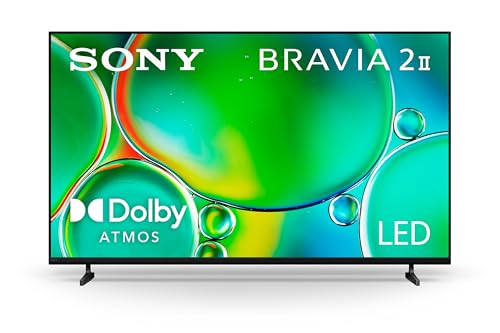
Sony 75-Inch BRAVIA 2 II LED TV
Best for: big-screen PlayStation 5 gaming and streaming
- Screen Size
- 75 Inch
- Resolution
- 4K
- Display Technology
- LED
- HDR Format
- HDR
- Smart Platform
- Google TV
- Dimensions
- 15.5 × 65.7 × 40.7 inches
This 75-inch LED TV gives you a large screen driven by the 4K Processor X1 and Motionflow XR motion handling. It runs on the Google TV platform with built-in Apple AirPlay 2 and Google Cast support. For gaming, it pairs with the PlayStation 5 through Auto HDR Tone Mapping and Auto Genre Picture Mode. It suits viewers who want a large display for streaming.
- Large 75-inch 4K UHD LED screen
- PlayStation 5 features including Auto HDR Tone Mapping
- Google TV with Apple AirPlay 2 and Google Cast
- Motionflow XR motion handling and 4K XR-Reality PRO upscaling
- Standard LED panel lacks OLED per-pixel lighting
- Uses basic 4K Processor X1 without Google Gemini integration
- You want a 75-inch screen for Google TV streaming.
- You use a PlayStation 5 and want Auto HDR Tone Mapping.
- You prefer an OLED panel for true black levels.
- You require Dolby Vision HDR processing.
Verdict: Sony 75-Inch BRAVIA 2 4K LED TV provides a wide 75-inch picture with dedicated PlayStation 5 visual features. It fits viewers who prioritize screen size and Google TV connectivity over OLED panel technology.

Sony 85-Inch BRAVIA 3 4K LED Google TV
Best for: large living rooms and PlayStation 5 gaming
- Screen Size
- 85 inches
- Resolution
- 4K UHD
- Display Technology
- LED
- HDR Format
- Dolby Vision
- Smart Platform
- Google TV
- Audio Format
- Dolby Atmos
This 85-inch 4K LED television runs Google TV with Google Assistant voice control. Key features include Dolby Vision HDR, Dolby Atmos audio, and dedicated PlayStation 5 settings like Auto HDR Tone Mapping. Triluminos Pro processing handles color reproduction. This display fits you if you have a spacious room with viewing distances of 15 feet or more.
- 85-inch 4K UHD screen with Triluminos Pro color
- Supports Dolby Vision HDR and Dolby Atmos audio
- Auto HDR Tone Mapping for PlayStation 5
- Integrated Google Assistant for voice navigation
- Weighs 99.6 pounds, requiring heavy-duty mounting support
- 3.8-inch body depth is thicker than slimmer OLED alternatives
- You have at least 15 feet of distance between your seating and the screen.
- You game on a PlayStation 5 and want Auto HDR Tone Mapping.
- You want an 85-inch display that runs the Google TV operating system.
- You sit closer than 15 feet from your television.
- You need a lightweight display that weighs less than 99.6 pounds.
Verdict: Sony 85-Inch BRAVIA 3 4K LED TV delivers massive scale and PS5-specific picture adjustments for rooms that can accommodate a 15-foot viewing distance. It gives large-room movie watchers and console gamers expansive 4K presentation with Dolby Vision and Dolby Atmos.
Sony 75-Inch BRAVIA 3 II 120Hz 4K LED TV
Best for: large-screen high-frame-rate gaming in bright rooms
- Screen Size
- 75 Inch
- Resolution
- 4K
- Display Technology
- LED
- Refresh Rate
- 120Hz
- HDR Format
- Dolby Vision
- Smart Platform
- Google TV
This renewed 75-inch LED TV gives you 4K resolution paired with a native 120Hz refresh rate. It includes HDMI 2.1 support for 4K gaming at 120Hz, VRR, and ALLM alongside an anti-glare screen coating. It suits you if you need a large display for fast gaming and bright-room viewing with Dolby Vision.
- Native 120Hz refresh rate with Motionflow XR
- HDMI 2.1 support with 4K/120, VRR, and ALLM
- Anti-Glare Screen technology for bright rooms
- Dolby Vision, Dolby Atmos, and DTS:X support
- Renewed unit rather than factory-new condition
- Standard LED panel rather than OLED display tech
- Heavy physical footprint at 68.8 pounds
- You want a 75-inch display with 4K at 120Hz gaming support.
- You need anti-glare screen treatment for rooms with ambient light.
- You use a PlayStation 5 and want Auto HDR Tone Mapping.
- You require a brand-new factory-sealed television.
- You prefer an OLED panel for deeper contrast.
Verdict: Sony 75-Inch BRAVIA 3 II 4K 120Hz TV provides a large anti-glare screen with HDMI 2.1 gaming support. It fits console players and sports viewers needing smooth motion in bright spaces.
Specifications side by side
| Spec | Sony 65-Inch BRAVIA 3 II Anti-Glare TV | Sony 48-Inch BRAVIA 6 OLED TV | Sony 75-Inch BRAVIA 2 II LED TV | Sony 85-Inch BRAVIA 3 4K LED Google TV | Sony 75-Inch BRAVIA 3 II 120Hz 4K LED TV |
|---|---|---|---|---|---|
| Screen Size | 65 Inch | 48 Inch | 75 Inch | 85 inches | 75 Inch |
| Resolution | 4K | 4K | 4K | 4K UHD | 4K |
| Display Technology | LED | OLED | LED | LED | LED |
| Refresh Rate | 120Hz | – | – | – | 120Hz |
| HDR Format | Dolby Vision | Dolby Vision | HDR | Dolby Vision | Dolby Vision |
| Smart Platform | Google TV | Google TV | Google TV | Google TV | Google TV |
| Audio Format | Dolby Atmos, DTS:X | Dolby Atmos, DTS:X | – | Dolby Atmos | Dolby Atmos, DTS:X |
| Features | Anti-Glare Screen | – | – | – | – |
| Size | 65 | 48 | 75 | 85-Inch | 75 |
| Dimensions | 11.4 × 57 × 35.6 inches | 10.8 × 42.2 × 25.7 inches | 15.5 × 65.7 × 40.7 inches | 3.8 × 74.8 × 42.9 inches | 13.8 × 65.8 × 40.6 inches |
| Weight | 45.9 pounds | 27.6 pounds | 61.7 pounds | 99.6 pounds | 68.8 pounds |
| Color | Black | – | – | Black | Black |
| Model | K-65XR30M2 | K48A60 | K75S20M2 | K85S30 | – |
How to Choose a Sony 4K TV
Check the Refresh Rate
You should check the native panel refresh rate before buying. Standard 60Hz panels handle everyday television and streaming video smoothly. If you connect high-end gaming consoles or watch fast sports broadcasts, target a 120Hz display instead. A 120Hz panel refreshes screen frames twice as fast, reducing visible blur during rapid movement. The Sony 75-Inch BRAVIA 3 II 120Hz 4K LED TV provides this higher refresh rate for smooth gaming action.
Verify Stand Depth Dimensions
You need to inspect the stand depth before placing a television on an existing media console. Large screens often require deep stands for balance. Check the length measurement on the specification sheet to ensure your furniture has enough room. The Sony 75-Inch BRAVIA 2 II LED TV lists a stand length of 15.5 inches, demanding a deep tabletop surface. Measure your furniture depth first to avoid overhang or stability issues.
Check Wall Mount Weight
You must verify the total weight of the television if you plan to install it on a wall bracket. Heavy displays require sturdy wall studs and hardware rated to support significant mass safely. The Sony 85-Inch BRAVIA 3 4K LED Google TV weighs 99.6 pounds without accessories. Confirm that your wall mount bracket and wall anchors match or exceed this listed weight specification before attempting installation in your home entertainment room.
Confirm Dolby Vision Support
You should check which high dynamic range formats the television decodes. Standard HDR10 applies static brightness settings across an entire video. Formats like Dolby Vision deliver dynamic metadata, adjusting contrast and highlight intensity frame by frame. Movie watchers who stream modern content will appreciate this extra tonal detail. The Sony 65-Inch BRAVIA 3 II Anti-Glare TV includes Dolby Vision support, ensuring compatibility with advanced mastering standards across popular streaming applications and discs.
Evaluate the Smart Platform
You should check the operating system to confirm your preferred streaming apps run natively without extra streaming sticks. All models in this guide run Google TV, which aggregates movies, live television, and series into a single home screen. If you rely on personalized viewing profiles and voice-activated search, Google TV organizes content by viewing habits. The Sony 48-Inch BRAVIA 6 OLED TV integrates this system directly, minimizing the need for external streaming boxes.
Frequently asked questions
Which smart TV platform do these Sony televisions use?
Every Sony television in this guide runs on Google TV. This operating interface organizes your streaming applications, live channels, and media subscriptions into a single home screen. It lets you browse entertainment without switching between separate menus. You can access apps and services directly through the built-in system.
Do these Sony televisions support Dolby Vision HDR?
Several options support Dolby Vision, including the 65-Inch BRAVIA 3 II, 48-Inch BRAVIA 6 OLED, and 85-Inch BRAVIA 3. Dolby Vision provides dynamic HDR metadata scene by scene. This adjusts contrast and color parameters continuously for compatible films. The 75-Inch BRAVIA 2 II listing does not specify this format.
What physical space do you need for the 85-inch Sony BRAVIA 3?
You need a wide console or wall area because the 85-Inch BRAVIA 3 measures 74.8 inches wide and 42.9 inches high. It weighs 99.6 pounds. Sony lists a 15-foot viewing distance for this model. You should measure your room depth and wall studs before mounting such a large screen.
Which Sony TV models feature anti-glare screen technology?
Both the 65-Inch BRAVIA 3 II and the 75-Inch BRAVIA 3 II feature anti-glare screen technology. This coating diffuses incoming light reflections from windows and lamps across the panel surface. It helps preserve black levels and color clarity when you watch television in spaces with high ambient light or multiple light fixtures.
Which Sony options offer specific PlayStation 5 visual features?
The 75-Inch BRAVIA 2 II and 85-Inch BRAVIA 3 list dedicated visual adjustments for PlayStation 5 consoles. These settings tune image parameters to match console output automatically. You receive optimized HDR mapping and visual response without manual picture calibration. Both models provide massive display sizes for console gaming sessions.
How heavy are the 75-inch Sony televisions in this guide?
The two 75-inch models weigh between 61.7 and 68.8 pounds. Specifically, the BRAVIA 2 II weighs 61.7 pounds, while the BRAVIA 3 II weighs 68.8 pounds. You should verify that your entertainment stand or wall bracket can hold at least 70 pounds before installing either 75-inch television safely.
See also
Prices and specifications above are read from the product page and can change without notice. Scores are out of 10, based on listed specifications and buyer feedback; nothing on this page comes from handling the product.


