
As Amazon Associates, we earn from qualifying purchases. This means we may receive a small commission at no extra cost to you if you click through and make a purchase.
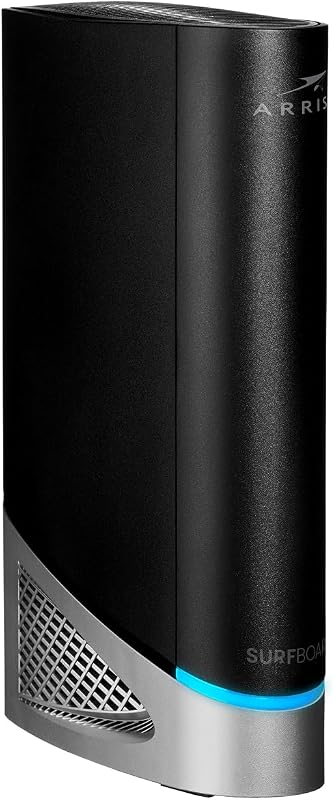
The ARRIS SURFboard G54 is an ultra-high-performance networking gateway that combines a DOCSIS 3.1 cable modem and a next-generation Wi-Fi 7 wireless router inside a single standalone unit. Manufactured by CommScope to provide top-tier wireless bandwidth, lower latency, and broad wireless coverage across large living areas, it represents an all-in-one solution for households looking to support multi-gigabit cable plans without managing separate hardware boxes. If you want a unified home networking hub that combines multi-gigabit physical connections with advanced quad-band wireless speeds reaching up to 18 Gbps, this system offers outstanding headroom for high-demand streaming, competitive gaming, and multi-device households.
This all-in-one gateway is well suited for busy families, remote workers, and online gaming enthusiasts who subscribe to gigabit or multi-gigabit cable internet tiers and want to eliminate monthly modem leasing fees while blanketing up to 5,000 square feet in strong signal. On the other hand, shoppers subscribing to modest broadband tiers or households utilizing fiber-to-the-home, DSL telephone lines, or satellite connections will want to look elsewhere, as this specialized cable unit offers far more power than entry-level plans require and works strictly on coaxial cable systems.
ARRIS SURFboard G54 at a Glance
| Feature Specification | Listing Detail |
|---|---|
| Device Type | Cable Modem and Wi-Fi 7 Router Combination |
| Modem Standard | DOCSIS 3.1 |
| Wi-Fi Specification | BE18000 Quad-Band Wi-Fi 7 |
| Maximum Wireless Throughput | Up to 18 Gbps |
| Wireless Coverage Area | Up to 5,000 square feet |
| Supported Service Tiers | Plans up to 10 Gbps |
| Ethernet Port Count | One 10-Gigabit port and four 1-Gigabit ports |
| Compatible Cable Providers | Xfinity, Spectrum, Cox |
| Hardware Weight | 3.1 pounds |
| Package Contents | ARRIS SURFboard G54 Cable Modem, Power Supply, Quick-Start guide |
Next-Generation Wi-Fi 7 Wireless Coverage and Speed
In this ARRIS SURFboard G54 review, the most forward-looking aspect of the platform is the inclusion of the latest Wi-Fi 7 wireless standard. Wi-Fi 7 introduces substantial improvements in data handling, radio frequency allocation, and transmission efficiency over previous wireless generations. Operating under a BE18000 designation, the unit uses a quad-band wireless architecture to provide theoretical combined wireless transfer speeds reaching up to 18 Gbps. For first-time buyers who find networking terms confusing, think of Wi-Fi bands as distinct traffic corridors: while standard household routers broadcast across two bands that easily become congested, this unit opens four distinct wireless corridors to keep your home data flowing smoothly without digital congestion.
Coverage is another major strength of the hardware, delivering an operating range of up to 5,000 square feet. This extensive reach makes the ARRIS G54 for large homes an exceptionally practical option, easily sending strong wireless signals across sprawling single-story layouts, multi-level houses, and finished basements. Because the internal antenna array projects a balanced signal in all directions, household members can enjoy dependable wireless reception in distant bedrooms and home offices without running into weak dead zones or needing to set up complex plug-in range extenders.
Modern homes support dozens of connected devices, including personal computers, smartphones, tablets, smart televisions, gaming consoles, smart thermostats, wireless printers, and household security accessories like an interactive pet camera or furbo 360 dog camera. Having quad-band Wi-Fi 7 capacity prevents low-bandwidth smart household accessories from slowing down high-bandwidth activities. As a result, family members can stream high-definition media, download work assets, and enjoy smooth online gaming sessions simultaneously without encountering unexpected buffering or sluggish connection speeds.
DOCSIS 3.1 Cable Performance and Multi-Gigabit Speeds
At the center of the physical cable interface sits the ARRIS SURFboard G54 DOCSIS 3.1 engine. DOCSIS 3.1 is the leading standard for high-bandwidth data transmission over residential coaxial lines, delivering enhanced spectral efficiency and wider communication channels compared to older cable standards. The gateway delivers a maximum downstream data transfer rate of 10,000 megabits per second (10 Gbps) alongside a maximum upstream data transfer rate reaching 10 gigabits per second. This generous capacity ensures that your physical gateway has the headroom required to support modern multi-gigabit cable subscriptions today and well into the future.
Understanding the ARRIS G54 specs helps clarify why having this level of hardware capability matters for a long-term investment. Many older cable modems max out around 1 Gbps, meaning that if your internet service provider rolls out higher speed tiers in your neighborhood, an outdated modem acts as an artificial bottleneck that slows down your incoming connection. Because this gateway supports cable tiers reaching all the way to 10 Gbps, your home network can immediately scale to faster plans as your provider expands local infrastructure without requiring you to replace your equipment.
Beyond raw bandwidth numbers, DOCSIS 3.1 technology fundamentally improves latency management. Latency refers to the round-trip response time it takes for data packets to travel between your home devices and external web servers. By minimizing communication delay across the coaxial line, this CommScope-manufactured system reduces lag spikes during online competitive multiplayer gaming and eliminates the micro-stutters often experienced during remote work video conferences, providing a responsive foundation for everyday web use.
Port Selection and Wired Connectivity Options
While wireless convenience is essential for phones, tablets, and portable electronics, physical Ethernet cables remain the premier option for ultra-low latency and consistent throughput. The ARRIS G54 Ethernet ports provide a versatile combination of legacy compatibility and next-generation speed. The back panel includes five total Ethernet jacks: four standard 1-Gigabit Ethernet ports and one ultra-fast 10-Gigabit Ethernet port, offering complete flexibility for your wired home setup.
The standout feature of this port arrangement is the dedicated 10-Gigabit Ethernet jack. Most traditional consumer modems and routers top out at 1 Gbps or 2.5 Gbps per port, which creates a physical bottleneck if your cable subscription delivers multi-gigabit speeds. With a full 10 GbE interface, you can connect a high-performance desktop workstation, a network-attached storage system, or a multi-gigabit desktop switch and immediately exploit the maximum speed your internet plan delivers, making large file transfers and heavy data backups feel practically instantaneous.
Complementing the 10 GbE port, the four 1-Gigabit Ethernet jacks provide reliable, dedicated wired connections for stationary electronics that do not require multi-gigabit bandwidth. You can plug in home gaming consoles, streaming television boxes, networked office printers, or security hubs without needing to buy an external expansion switch. When compared to other popular cable networking hardware such as the netgear nighthawk cax30s, the G54 stands out by delivering that dedicated 10 GbE connection alongside its robust quad-band Wi-Fi 7 wireless engine, giving users an edge in physical multi-gigabit connectivity.
Internet Provider Compatibility and Setup Process
Before selecting any retail cable networking device, verifying provider compatibility is an essential first step. The list of ARRIS G54 compatible providers includes three of the largest cable internet operators: Xfinity, Spectrum, and Cox. Because ARRIS is a long-standing, trusted industry brand used in over 260 million homes, cable operators maintain established network integration profiles for their hardware. It is important to emphasize, however, that this model is specifically engineered as a cable gateway, meaning it will not function on direct fiber-optic networks, digital subscriber line (DSL) services, or satellite connections.
Following the ARRIS G54 setup guide is straightforward even for beginners who have never replaced their home network hardware before. Inside the packaging, you receive the ARRIS SURFboard G54 Cable Modem, a dedicated AC power supply, and an easy-to-follow quick-start guide. The basic setup routine involves connecting your coaxial cable securely from the wall outlet into the back of the modem, plugging the power supply into an electrical receptacle, and waiting for the front-panel status lights to indicate that the unit is ready for network provisioning.
Once the physical connections are completed, you activate the gateway by either opening your cable provider’s smartphone application or navigating to their web-based self-activation portal. During this step, you will be prompted to register the device using its unique MAC address and serial number printed on the product label. Once the provider’s network recognizes the unit and pushes the appropriate configuration profile, you can follow the quick-start guide to establish your custom wireless network name and password, successfully bringing all your household gadgets online in a matter of minutes.
Long-Term Equipment Ownership and Value
Weighing the ARRIS G54 vs rental modem debate shows clear long-term benefits for homeowners looking to streamline monthly expenses. Cable internet companies routinely charge recurring monthly fees simply to loan customers their standard equipment. Over the course of a multi-year subscription, paying continuous leasing charges for standard hardware represents a recurring drain on your household budget for devices you will never actually own. Purchasing your own high-end gateway eliminates these recurring equipment charges permanently.
Beyond financial savings over time, owning a flagship device ensures that you control your home network’s wireless performance. Internet service providers often distribute mid-tier rental gateways that lack the newest wireless standards, resulting in weaker coverage, slower Wi-Fi throughput, and limited internal processing headroom when dozens of smart home gadgets connect simultaneously. By switching to your own quad-band Wi-Fi 7 gateway, you unlock significantly better range, lower latency, and higher speeds across your entire home.
Deciding whether the ARRIS G54 Wi-Fi 7 cable modem is worth the investment ultimately depends on your speed tier and digital habits. So, is the ARRIS G54 worth it for an average home? For multi-device households, gamers, and remote professionals on gigabit cable plans, the BE18000 speeds, 5,000 square foot range, and 10 GbE wired port provide unmatched future-proofing and performance. The unified 3.1-pound vertical chassis from CommScope also keeps your entertainment center neat by eliminating extra power bricks and patch cords, all backed by a 1-year manufacturer warranty.
ARRIS SURFboard G54 Pros and Cons
Two swatches, side by side. Everything on both sides is read from the product listing and from buyer feedback – nothing here comes from handling the product.
What works
- Quad-band Wi-Fi 7 wireless speeds up to 18 Gbps
- DOCSIS 3.1 supports internet plans up to 10 Gbps
- Extensive wireless coverage reaching up to 5,000 square feet
- Dedicated 10-Gigabit Ethernet port plus four 1-Gigabit ports
- Eliminates monthly modem equipment rental fees
What to check
- Incompatible with fiber-optic, DSL, or satellite internet
- Certified only for Xfinity, Spectrum, and Cox networks
- All-in-one design prevents upgrading router separately
Who Should Buy the ARRIS SURFboard G54
Buy It If
- You subscribe to a high-speed or multi-gigabit cable plan with Xfinity, Spectrum, or Cox and want to eliminate recurring equipment rental fees.
- You live in a spacious home up to 5,000 square feet and want wide-reaching, quad-band Wi-Fi 7 coverage without cluttering rooms with mesh extenders.
- You own a high-performance computer, storage server, or multi-gig switch that can directly leverage the ultra-fast 10-Gigabit Ethernet port.
- You prefer an integrated, all-in-one cable modem and router combo that minimizes messy power supplies and interconnect cables.
Skip It If
- You receive internet through a direct fiber-optic line, DSL telephone wire, or satellite connection rather than a traditional coaxial cable line.
- You subscribe to an entry-level broadband speed tier where multi-gigabit DOCSIS 3.1 and BE18000 Wi-Fi 7 capabilities would be vastly underutilized.
- You prefer keeping your modem and router as separate standalone units so you can upgrade individual networking components independently over time.
Final Verdict
The ARRIS SURFboard G54 is a premier home networking gateway that unites DOCSIS 3.1 cable technology with next-generation BE18000 quad-band Wi-Fi 7 in one sleek, space-saving enclosure. By delivering theoretical wireless speeds up to 18 Gbps, extensive wireless coverage spanning up to 5,000 square feet, and a versatile wired layout featuring four 1-GbE ports plus a blazing 10-GbE connection, this gateway provides exceptional headroom for busy digital households, competitive gamers, and remote professionals alike.
While its advanced feature set is overkill for entry-level internet packages and incompatible with non-cable internet providers, it represents the gold standard for high-speed cable subscribers who want to eliminate recurring monthly rental fees and enjoy reliable whole-home connectivity. Backed by CommScope engineering, a 1-year manufacturer warranty, and a trusted brand history of over 260 million modems sold, the G54 is a remarkable all-in-one solution that delivers extraordinary performance and lasting peace of mind.
FAQ
Which internet service providers work with the ARRIS SURFboard G54?
The ARRIS SURFboard G54 is certified to work with major cable internet operators including Xfinity, Spectrum, and Cox. Because it relies on a DOCSIS 3.1 coaxial interface, it is not compatible with direct fiber-optic connections, digital subscriber line (DSL) phone lines, or satellite providers. If you use a cable provider not explicitly listed, the listing does not specify support, so you should contact your provider before purchasing.
What is the difference between DOCSIS 3.1 and Wi-Fi 7 on this gateway?
DOCSIS 3.1 refers to the cable modem technology that brings the physical internet connection into your house through the coaxial wall outlet, supporting download plans up to 10 Gbps. Wi-Fi 7 is the wireless router technology that broadcasts that internet connection through the air to your wireless gadgets. The G54 combines both technologies into one convenient housing, delivering combined wireless speeds up to 18 Gbps across four distinct frequency bands.
How many wired devices can plug into the ARRIS SURFboard G54?
The gateway includes five physical Ethernet ports on its rear panel, allowing you to connect up to five wired devices simultaneously. This port array consists of one ultra-fast 10-Gigabit Ethernet port for maximum multi-gigabit performance on high-end computers or network switches, along with four standard 1-Gigabit Ethernet ports for gaming consoles, smart TVs, or office printers.
Can the ARRIS SURFboard G54 eliminate monthly rental fees?
Yes, purchasing and activating your own compatible cable gateway allows you to return your provider-leased modem or router. Doing so eliminates the recurring monthly equipment rental charges that providers like Xfinity, Spectrum, and Cox typically include on customer bills, allowing your equipment investment to pay for itself over time.
What items are included inside the retail box?
According to the official product specifications, the package includes one ARRIS SURFboard G54 Cable Modem unit, its dedicated power supply, and a quick-start guide to help you complete physical connections and service activation.
Prices and specifications above are read from the product page and can change without notice. Scores are out of 10, based on listed specifications and buyer feedback; nothing on this page comes from handling the product.


