
As Amazon Associates, we earn from qualifying purchases. This means we may receive a small commission at no extra cost to you if you click through and make a purchase.
Finding a home router that eliminates buffering without requiring an engineering degree can feel overwhelming for first-time buyers. The TP-Link Archer A10, widely sought by shoppers searching for an ac2600 tp link solution, is built to provide dependable dual-band wireless speeds and wide signal coverage in a beginner-friendly package. Designed around the established Wi-Fi 5 standard, this unit delivers up to 1733 Mbps on its faster band and pairs simple smartphone management with smart traffic optimization. It serves as an accessible, high-throughput networking upgrade that solves everyday living room dead zones without unnecessary technical friction.
This dual-band router is ideal for average-sized households, remote workers, and busy families who need consistent connections across personal computers, smart televisions, and mobile devices. If your household streams high-definition movies, joins video calls, and manages multiple smart accessories, its automatic band steering and traffic prioritization create a seamless everyday experience. However, shoppers living in massive multi-story properties with dense masonry walls, or tech enthusiasts wanting the bleeding-edge Wi-Fi 6 or Wi-Fi 7 standards for future-proofed multi-gigabit broadband, will want to look at more expansive mesh systems instead.
TP-Link Archer A10 at a Glance
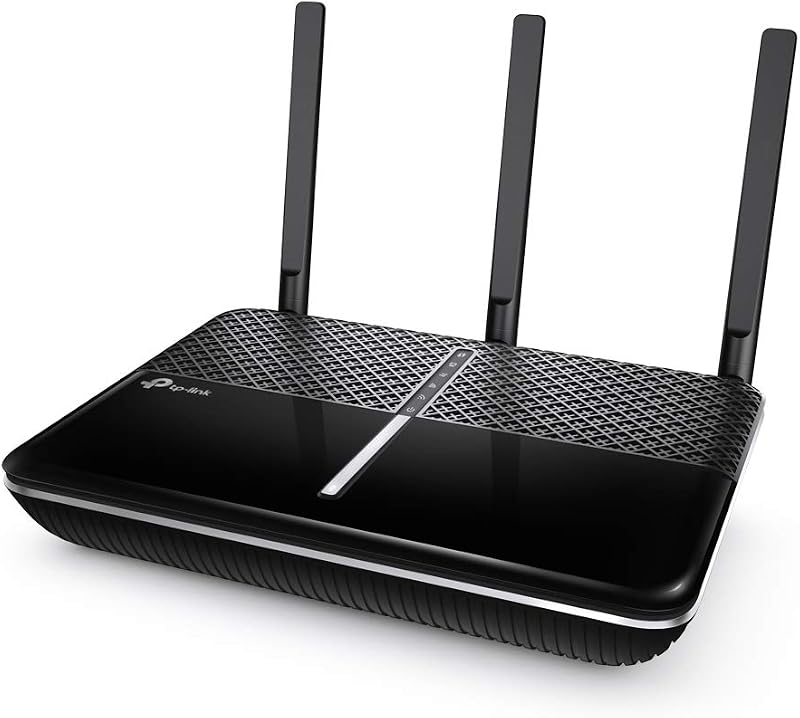
| Feature | Specification |
|---|---|
| Wi-Fi Generation | Wi-Fi 5 |
| Wireless Compatibility | 802.11a, 802.11b, 802.11g, 802.11n, 802.11ac |
| Maximum Band Speeds | 1733 Mbps (5 GHz) + 800 Mbps (2.4 GHz) |
| Antenna Setup | 4 Antennas (3 External, 1 Internal) |
| Network Ports | 5 Gigabit Ports (1000 Mbps LAN Bandwidth) |
| Wireless Optimization | MU-MIMO, Beamforming, Smart Connect, Airtime Fairness |
| Remote Network Access | OpenVPN and PPTP VPN Server |
| Smart Assistant Integration | Works with Amazon Alexa |
| Security Protocols | WPA, WPA2, WPA/WPA2-Enterprise, WPS |
| Operating System | TP-Link A10 Firmware |
Wireless Speed and Band Performance
The foundation of this dual-band wireless router is its split-frequency architecture, which divides household internet traffic across two separate radio channels. The unit provides top theoretical speeds of up to 1733 Mbps on the 5 GHz band and up to 800 Mbps on the 2.4 GHz band. For beginners unfamiliar with wireless frequencies, the 2.4 GHz band acts as the long-distance workhorse, sending reliable signals through interior drywall, while the 5 GHz band acts as an express highway, offering faster data rates at closer distances. By separating devices between these two frequencies, the router prevents low-demand devices from slowing down data-hungry applications.
Households relying on the tp link ac2600 for streaming high-resolution 4K media and participating in remote work video meetings will appreciate how the unit coordinates high-speed traffic. Rather than requiring users to manually guess which frequency each gadget should join, the onboard Smart Connect feature automatically pairs each connected device with the most suitable band based on current network conditions. When you walk from a home office near the router into the kitchen, the system maintains your connection so downloads and video streams continue without abrupt dropouts or manual intervention.
In addition to streaming and remote work, modern homes often support numerous low-bandwidth smart accessories, such as a 2k qhd indoor/outdoor security camera, tapo c120 that requires steady wireless connectivity. The router manages these constant background connections across its 2.4 GHz band, leaving the higher-speed 5 GHz channel clear for personal computers, gaming consoles, and work laptops. As noted in the manufacturer specifications, actual wireless transmission speeds are influenced by building materials, physical obstacles, and network overhead, but the dual-band capacity provides plenty of headroom for standard family usage.
Coverage Range and Antenna Architecture
Radio coverage in the home depends heavily on antenna design and physical broadcast reach. The tp-link ac2600 range is powered by four antennas in total, combining three external adjustable antennas on the top chassis with one internal antenna inside the enclosure. External antennas allow users to angle the broadcast elements to optimize signal spread across single-story flats or split-level spaces, while the internal component maintains uniform omnidirectional coverage directly around the base station. This multi-antenna setup is engineered to expand overall network reach and reduce frustrating dead spots in bedrooms, basements, and home offices.
A primary technical advantage of this unit is tp-link archer a10 beamforming technology. Traditional routers broadcast radio signals uniformly in all directions, regardless of where your devices are located, which leads to dispersed and wasted wireless energy. Beamforming works differently by detecting the location of connected personal computers, tablets, and smartphones, then concentrating a focused directional beam directly toward each active client. This targeted broadcast helps maintain stronger signal integrity at greater distances, minimizing dropped connections when browsing from the far corners of a home.
While the antenna configuration delivers solid coverage for standard suburban properties and single-family houses, physical layout still plays a major role. Heavy materials such as solid brick walls, concrete subfloors, and dense metal ductwork will naturally attenuate radio signals. For vast multi-story properties or spread-out layouts where a single broadcast point cannot reach the outer perimeter, an expandable multi-node setup like the tp-link deco xe75 pro axe5400 may be more suitable than relying on a standalone base station.
Multi-Device Handling and Network Efficiency
Older routers often struggle when multiple family members try to download files, stream shows, and play games at the exact same moment. As an authentic tp-link mu-mimo router, the Archer A10 utilizes Multi-User, Multiple-Input, Multiple-Output technology to communicate with multiple compatible devices concurrently. Rather than serving one device at a time in a rapid queue—which can introduce micro-stutters and buffering—MU-MIMO establishes simultaneous data streams so several personal computers and mobile devices receive data simultaneously without waiting their turn.
Alongside multi-user communication, the Archer A10 incorporates Airtime Fairness to optimize network balance across legacy and modern hardware. In standard networks, an older gadget with a slow Wi-Fi adapter can slow down the entire system because the router spends excessive time transmitting data to that sluggish receiver. Airtime Fairness addresses this bottleneck by allocating equal transmission time to all connected devices rather than equal packet volume. This ensures that newer smartphones and personal computers can transmit at their full potential without being held back by older legacy electronics.
Wireless connections are complemented by five physical network ports integrated into the router casing, offering 1000 Mbps LAN port bandwidth across Gigabit Ethernet connections. For home offices, desktop personal computers, network-attached storage enclosures, or media streamers, plugging directly into a gigabit port delivers maximum throughput and eliminates any chance of wireless interference. The listing specifies a maximum upstream data transfer rate of 866 Mbps, giving wired and wireless devices robust upload capacity for cloud backups, video calls, and file transfers.
Setup, Management, and Smart Features
Complex web configuration menus often intimidate first-time networking buyers, but the tp link ac2600 setup is intentionally streamlined for beginners. As an intuitive tp-link tether app router, initial configuration can be handled entirely from a mobile phone interface using either iOS or Android. The Tether application walks users through connecting the router to their internet modem, creating a custom network name, and setting up a secure WPA or WPA2 password. In addition to the mobile app, users can utilize the intuitive phone UI or push the physical WPS button to connect supported devices without manually typing lengthy passwords.
Modern convenience is expanded through integrated Amazon Alexa voice control. By linking the router with compatible smart speakers, homeowners can enable or disable the guest Wi-Fi network using basic spoken commands. This feature is particularly practical for dinner parties or visiting relatives, as you can activate an isolated guest network instantly without having to open an app or share your private home Wi-Fi password. The TP-Link A10 firmware manages this guest segregation securely, preventing visitors from viewing shared network drives or smart home appliances.
For users who require secure access to home files while traveling, the unit includes an integrated OpenVPN and PPTP VPN server. This built-in server allows you to establish an encrypted tunnel from a remote laptop or smartphone back to your residential network across the public internet. This provides an extra layer of privacy when browsing on public coffee shop Wi-Fi and lets you access local network resources securely. Operating on a universal 120-240 volt power range, the router offers versatile electrical compatibility alongside its comprehensive security suite.
TP-Link Archer A10 Pros and Cons
Two swatches, side by side. Everything on both sides is read from the product listing and from buyer feedback – nothing here comes from handling the product.
What works
- Dual-band speeds up to 1733 Mbps on 5 GHz
- Four antennas with beamforming signal focusing
- MU-MIMO and Airtime Fairness traffic management
- Five high-speed Gigabit Ethernet network ports
- Quick mobile configuration via the Tether app
- Built-in OpenVPN and PPTP VPN server
What to check
- Limited to Wi-Fi 5 rather than newer standards
- Coverage limited in massive multi-story homes
- Requires compatible client devices for MU-MIMO benefits
Who Should Buy the TP-Link Archer A10
Buy It If
- You want a fast dual-band Wi-Fi 5 router capable of handling multiple 4K streams and video conferences.
- You prefer setting up and managing your home network through a beginner-friendly smartphone app rather than confusing web consoles.
- You need Gigabit Ethernet ports to establish reliable, high-speed wired connections for gaming consoles or personal computers.
- You want advanced traffic optimizations like MU-MIMO, Beamforming, and Airtime Fairness to balance family device usage.
Skip It If
- You need cutting-edge Wi-Fi 6 or Wi-Fi 7 hardware to maximize multi-gigabit broadband subscriptions.
- You own a massive multi-story property with thick masonry walls that requires a distributed mesh Wi-Fi system.
- You require specialized enterprise networking hardware beyond standard consumer WPA2 security protocols.
Final Verdict
Evaluating whether is tp-link ac2600 worth it comes down to matching your household demands with its balanced feature set. The TP-Link Archer A10 successfully addresses common connectivity complaints by pairing generous AC2600 theoretical bandwidth with four signal-amplifying antennas, beamforming directionality, and responsive MU-MIMO processing. By automating frequency selection with Smart Connect and keeping slower legacy gadgets from monopolizing the broadcast through Airtime Fairness, it delivers a consistent, lag-free online experience for everyday digital households.
While demanding technophiles may prefer newer wireless generations or modular mesh nodes for estate-sized grounds, this model represents an accessible, dependable solution for standard single-family homes and apartments. With effortless Tether app management, hands-free Alexa guest network controls, and built-in VPN server capabilities, the Archer A10 delivers exceptional everyday utility. It remains a smart, stress-free networking upgrade for anyone seeking reliable home Wi-Fi without complicated configuration routines.
FAQ
What are the key TP-Link Archer A10 specs every buyer should know?
The core tp-link archer a10 specs include dual-band Wi-Fi 5 speeds of up to 1733 Mbps on 5 GHz and 800 Mbps on 2.4 GHz, four antennas combining three external and one internal element, five Gigabit Ethernet ports with 1000 Mbps throughput, and support for WPA, WPA2, and WPA/WPA2-Enterprise security protocols.
Does the TP-Link Archer A10 support Wi-Fi 6?
No, the listing confirms that this router operates on the Wi-Fi 5 generation (802.11ac) while maintaining backward compatibility with 802.11a, 802.11b, 802.11g, and 802.11n standards. It does not support newer Wi-Fi 6 protocols.
How does the TP-Link Tether app help beginners during setup?
The Tether application provides an intuitive mobile phone interface that guides users step-by-step through physical cable connections, network naming, password creation, and firmware management, allowing complete setup in just a few minutes without using a computer web browser.
Can the Archer A10 handle multiple 4K video streams at once?
Yes, the combination of 1733 Mbps bandwidth on the 5 GHz band, MU-MIMO simultaneous data streams, and Smart Connect band steering enables the router to handle multiple concurrent high-definition video streams, remote work calls, and downloads across household devices.
How does the guest network feature work with Amazon Alexa?
The router pairs with Amazon Alexa smart assistants, allowing users to enable or disable the isolated guest Wi-Fi network using simple voice commands without having to log in to the Tether app or web interface.
Prices and specifications above are read from the product page and can change without notice. Scores are out of 10, based on listed specifications and buyer feedback; nothing on this page comes from handling the product.


